-5% on your 1st eSIMuntil October 31

You're standing at Incheon with a train ticket machine in front of you, Hangul everywhere, and a driver app that looks familiar until you try to use it. That first decision, taxi or transit, sets the tone for the whole trip, so get it right before you leave home. If you want the cleaner version of the airport-to-hotel handoff, the basics of an airport transfer are worth a quick look in advance, especially when you're juggling bags and data at the same time, like in this useful airport transfer explained guide.
Landing in Korea and Choosing Your First Map
The first hour in Korea is not the moment to improvise. Open the wrong app, and you'll waste time trying to force an English interface to do more than it can, or you'll end up staring at a map that won't help with walking, transit, or a taxi pickup.
What matters first is simple, which map do you trust when you're tired, jet-lagged, and offline risk is real. For most visitors, that means Naver Map for directions and local search, Kakao T through k.ride for taxis, and Google Maps only as a backup for familiar-looking labels, not as your main navigation tool.
Practical rule: if the app can't reliably get you from airport to hotel and from hotel to dinner, don't make it your primary tool.
That's the lens for this guide. You'll leave with a short setup list, a realistic view of English support, and a clear answer on what to install before departure, not after you're already in a taxi queue.
What Naver Map Is and Why It Matters in Korea
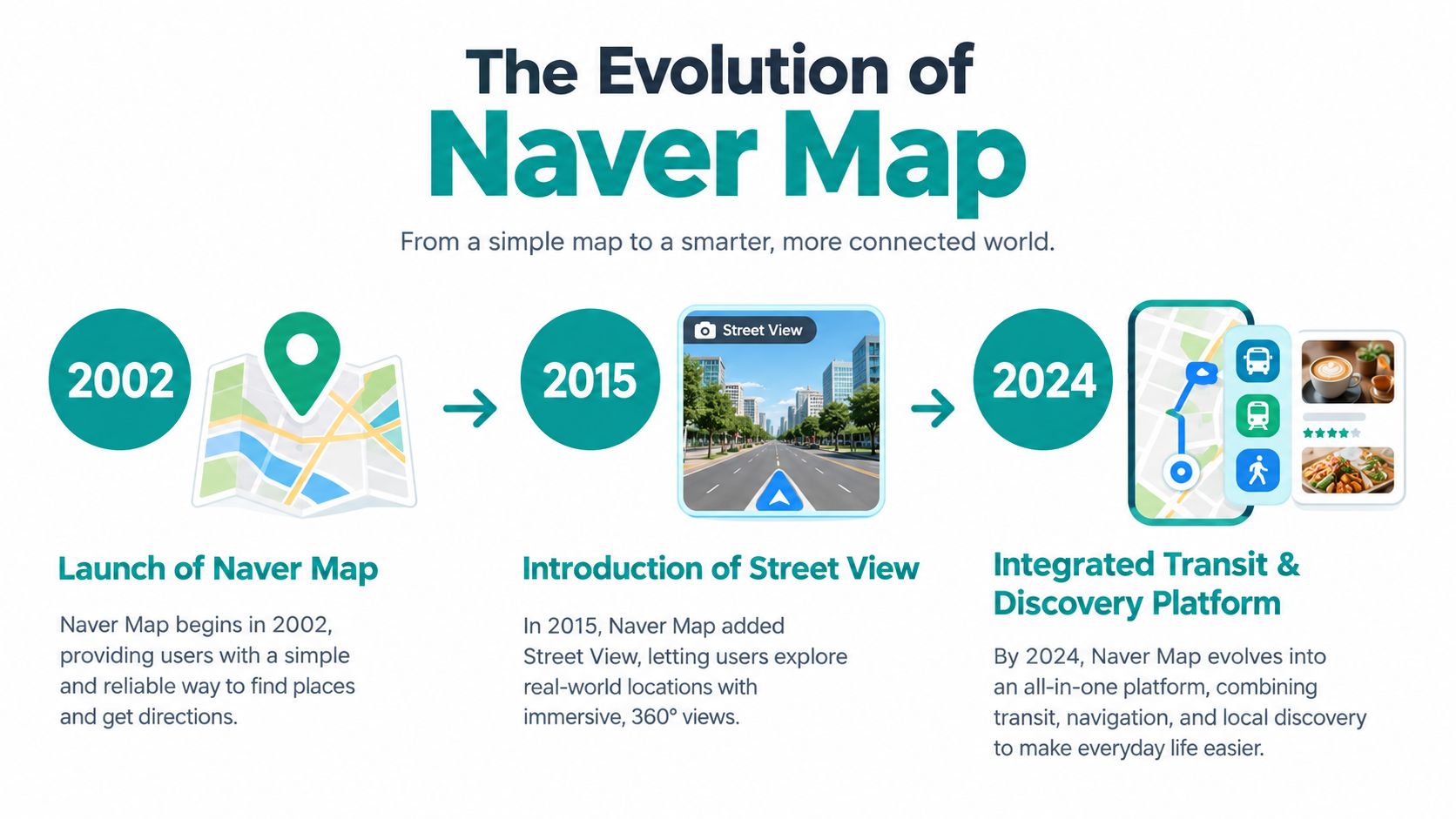
Naver Map isn't a tourist app bolted onto Korea from the outside. It started as a map service in 2002, then kept expanding into something much more useful for daily movement, with Street View and aerial view in 2010, bicycle and walking routing in 2011, nationwide city-bus search in 2011, indoor maps and nationwide weather in 2012, topographic maps in 2014, and turn-by-turn navigation in 2015 through a partnership with Mappy. Those milestones matter because they show a service built around Korean addresses, transit, and places, not just pretty map tiles. The service history and user scale are summarized in the Namu Wiki overview of Naver Map's development and in later usage reporting from ET News via Biz Chosun.
By early 2026, reported monthly active users were 28.92 million, with a January 2026 estimate of 28.8 million, ahead of KakaoMap and Google Maps in Korea. That scale is the point. When locals use one map at that level, you get a better chance of finding the right address, the right bus stop, and the right entrance.
Google Maps is useful in plenty of countries. In Korea, it's a weaker primary tool because local map data and routing are handled better by domestic services. Use Google Maps if you like the interface, but don't rely on it to be your main navigation layer.
Setting Up Naver Map Before Departure
Do the setup while you still have easy Wi-Fi. Once you're in a cab or underground, every extra minute you spend fixing settings feels longer than it should.
Download the right apps first
Install Naver Map and Kakao Map before you fly, and add k.ride if you want the English version of Kakao T for taxis. NAVER says its multilingual map service has supported English, Chinese, and Japanese since 2018, and its foreign visitor materials cover route info, real-time public transit arrivals, subway maps, and boarding guidance, so there's no reason to wait until arrival to start learning the workflow. You can also review the NAVER Map service page before you go.
Search your hotel, airport, and first dinner spot in English first, then look at the Korean name underneath. Save that Korean version as a screenshot or favorite, because taxi drivers can read that much faster than a half-loaded English listing.
Test the search flow before you fly
This is the habit that saves the most stress. Search your destinations in English, check whether the result matches the Korean name you copied, and confirm that the pin lands where you expect it to land. If the result looks thin or ambiguous, save the Korean address and move on.
The trip feels smoother when your data connection is already in place, so your plan for Korea data should already be decided. If you need a setup walkthrough for your phone's connectivity, this eSIM installation guide is a useful prep step.
Install taxi access before you need it
Kakao T via k.ride is the smart taxi move for visitors because it gives you an English path into a local ride-hailing system. Don't wait until rain starts or transit gets messy. Add the app, check your payment setup, and keep the Korean address of your hotel ready in case you need to hand it over fast.
A short rehearsal at home beats learning under pressure at the airport.
Search each place in English, then keep the Korean version. That one habit prevents most arrival mistakes.
Comparing Naver Map, Kakao Map, Kakao T, and Google Maps
Use the right app for the job instead of trying to force one app to do everything. That's the whole trick in Korea.
| App | Best for | English support | Notes |
|---|---|---|---|
| Naver Map | Public transit, subway transfers, walking routes, saved Korean addresses | English, Japanese, Simplified Chinese | Strongest all-around map for visitors who want reliable local navigation |
| Kakao Map | Korean place search and local listings | English support is available in the app experience, but verify current settings before travel | Useful backup when a place shows up differently on one platform |
| Kakao T, through k.ride | Taxi hailing | English interface is available through the visitor-focused service | Best when walking or transit isn't practical |
| Google Maps | Familiar UI, basic place lookup | English-first interface | Fine as a secondary reference, weaker as a primary Korea navigation tool |
The practical split is simple. Open Naver Map for trains, buses, and walking. Open k.ride when you want a taxi. Keep Kakao Map installed because local data can vary by neighborhood and one app may surface a place more cleanly than the other. Use Google Maps only when you want a familiar layout, not when you need dependable Korean routing.
NAVER's foreign-visitor guide also says the app supports route info, transit arrival times, subway maps, and boarding guidance, which is exactly why it belongs on your phone before departure. Kakao's taxi ecosystem is separate from mapping, so don't confuse the two.
What Actually Works in English on Naver Map
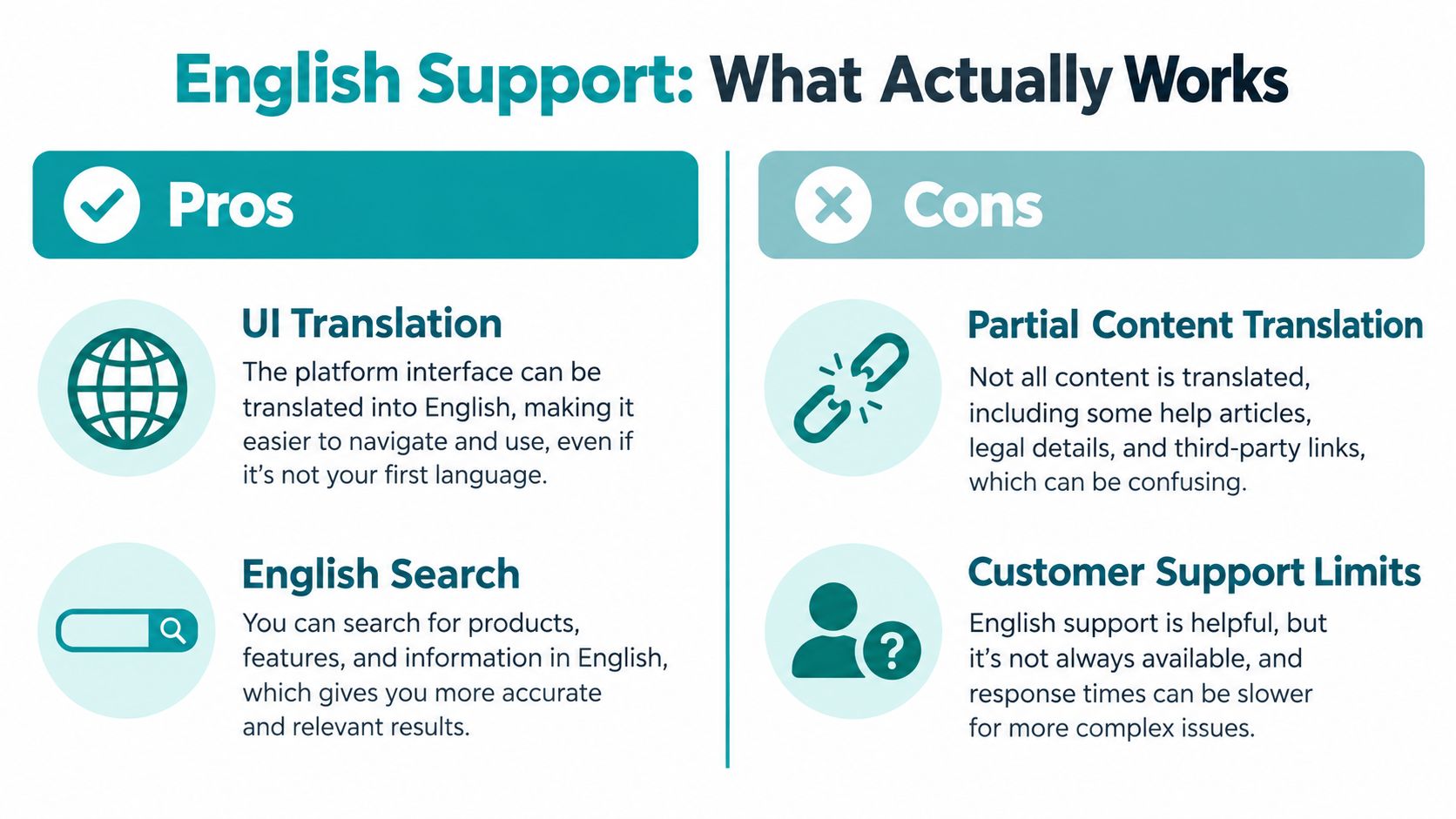
The biggest mistake travelers make is thinking English mode equals full English content. It doesn't.
What translation helps with
Naver Map's interface can switch to a language a visitor can work with, and that makes menus, buttons, and basic map labels far less intimidating. Search bars, route screens, and transit steps become usable enough for day-to-day travel.
What still stays Korean
Business names, user reviews, opening-hour notices, reservation rules, alert banners, and linked booking pages often stay Korean. That's the part most first-timers miss. You can understand the route and still miss the actual business detail that matters when you arrive.
Real-world rule: if the map result looks usable but the business info looks thin, trust the route and verify the destination details somewhere else.
Use a simple three-step habit. Search in English, copy the Korean name into your notes, then verify hours or closure notices with a translation tool or the business's own site. That approach is faster than pretending the app solved the language gap for you.
This distinction matters because the problem in Korea usually isn't getting to the right block. It's knowing whether the place is open, how to enter it, and whether the booking note was translated correctly.
Offline and Low-Connectivity Behavior

Don't assume Naver Map turns into a full offline travel app just because it's installed. Public guidance doesn't spell out a full offline-download mode, so you should treat the app as a live-data tool first.
That means live routing, transit updates, and walking navigation need a working connection. Spotty signal may still leave you with previously searched results, saved favorites, and whatever map area your phone has already loaded, but that's not the same thing as dependable offline navigation.
Save the essentials before you leave Wi-Fi:
- Airport, hotel, and first-day destinations
- Korean address screenshots for taxi handoff
- Saved favorites for stations, restaurants, and attractions
- A data plan or hotspot you can keep on
If you're trying to estimate whether map use will drain much data during a trip, this GPS and data usage guide is worth skimming before you fly.
The safest assumption is blunt, offline is a degraded mode, not a promise. That matters in subway tunnels, rural roads, and crowded travel periods when connections get flaky. Keep working data as the default.
Data, eSIMs, and When a Different Option Makes More Sense
Naver Map, Kakao Map, k.ride, translation, and messaging all depend on a live connection, so stop treating data as an afterthought. For Korea, a travel eSIM such as Simsima is the cleanest setup for many visitors. It gives you prepaid data only, so there is no local phone number, calls, or SMS. Install it on Wi-Fi before you leave, then let it activate when it first connects to a local network after arrival.
Setup is simple. On iPhone with iOS 17.4 or later and on Android, use the one-tap Smart Link install. If your device does not support that path, use the QR code email instead. Simsima covers 190+ destinations, supports top-ups through the account, replies to support requests within 24 hours, and offers a refund within 14 days if the eSIM has not activated yet. Installing it does not count as activation. Activation happens when it first connects at the destination. Check the plan details for the listed network, because Simsima uses the networks shown there and does not partner with carriers. If you are comparing options before departure, start with the South Korea eSIM page and the best eSIM for South Korea guide.
A local SIM makes more sense for a long stay. Pocket Wi-Fi is better for groups that want one hotspot to share. Carrier roaming is the simplest choice for a short trip if your home plan already covers Korea.
If you only need maps, translation, and taxi access, pick the data option that turns on cleanly and stays on. That matters more than chasing extras you will not use.
Pre-Departure Checklist and Common Questions
Set this up the night before you fly.
Download Naver Map and Kakao Map on Wi-Fi, then install k.ride or Kakao T if you want taxi access that works inside Korea. Set the app language to English, but do not expect English to solve everything. The interface can translate menus and labels, while place details and driver-facing information often still work better in Korean. Search your airport, hotel, and first-day stops before departure, then save the Korean address for each one. Test every app on home Wi-Fi so you know what opens, what logs in, and what needs live data.
If you're staying in a hotel, a quick look at hotel reception conversation scripts can make check-in easier when you're tired and your phone battery is low.
FAQ
Does Naver Map work without data?
Treat it as a live map, not an offline tool. Routing and updates need a connection.
Can I use Uber-style foreign ride apps in Korea?
Do not rely on them as your main option. Use k.ride or Kakao T instead.
What if a taxi driver can't read my screen?
Show the Korean address, not just the English name. A screenshot usually works better than speaking slowly.
Should I still keep Google Maps?
Yes, as a backup. It should not be your main Korea map.
If you want a deeper look at connectivity choices, refer to the South Korea eSIM guide mentioned earlier. My advice is simple. Install the map and taxi apps before departure, save the Korean addresses, and make sure your data is ready before you board.





#naver map#naver map english#kakao t taxi#korea travel apps#esim south korea

Dimitri MorvanFounder
Founder of Simsima. A passionate traveler based in Barcelona, he helps travelers stay connected without breaking the bank on roaming fees.
LinkedIn