-5% on your 1st eSIMuntil October 31
Data roaming means using your phone's internet through a foreign carrier's network instead of your home carrier's, and yes, it can cost significantly more than your domestic rate unless you have a specific plan. Turning off data roaming on your home line usually prevents cellular data charges, but a travel eSIM may need roaming turned on for its own line.
You're probably thinking about this before a trip, while checking passports, airport transfers, hotel confirmations, and whether your phone will work when you land. That last question matters because your phone can connect to a foreign network automatically, even when you haven't consciously chosen a carrier. A few background tasks, such as photo syncing, email retrieval, app updates, or video autoplay, can start using data as soon as the connection becomes available.
The confusing part is that data roaming isn't the same as every kind of phone use abroad. It specifically concerns cellular internet through another operator's network. Calls and SMS may follow different rules, and Wi-Fi doesn't count as cellular data roaming, although the Wi-Fi provider may still charge for access. The most important decision is to identify which SIM is supplying data and configure roaming for that line only.
The Moment You Land and Your Phone Starts Charging You
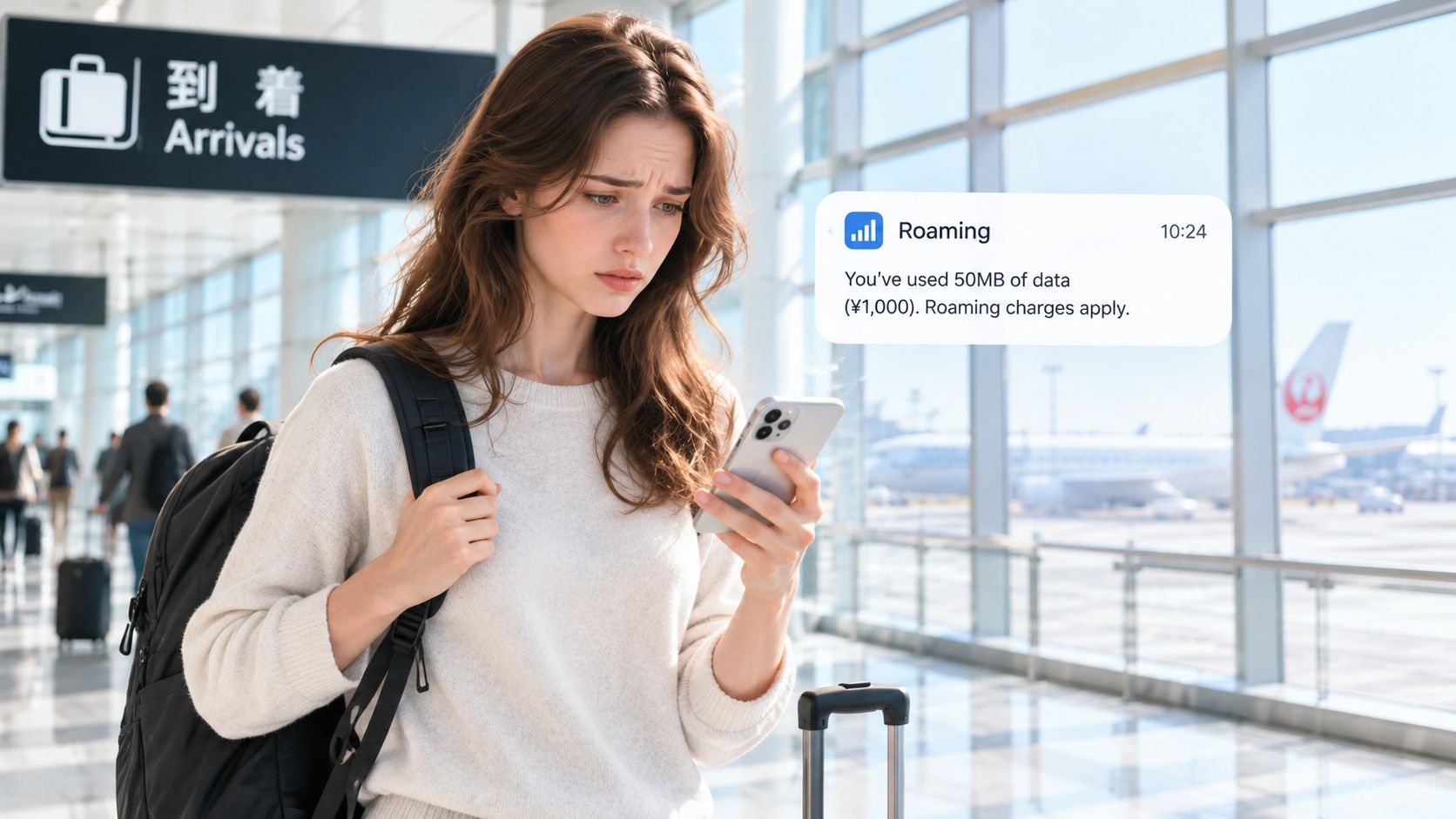
You've just arrived in Tokyo, Paris, or Bali. At the airport, you switch off airplane mode, open Maps to find the route to your hotel, and check a message from your driver. A notification appears, or you later see unfamiliar international usage on your account. The worry is immediate: did one map request really trigger a major charge?
What happened is simpler than it feels. Your phone connected to a local mobile operator because your home carrier's network doesn't operate there. The visited network carried the internet traffic, while your home carrier remained responsible for authenticating your subscription, recording usage, and applying the retail terms of your plan. That arrangement is data roaming.
Why the bill can surprise you
Domestic data allowances don't automatically apply abroad. Your carrier may have destination restrictions, a separate international package, fair-use conditions, spending controls, or out-of-bundle billing. Even if you haven't opened a streaming app, your phone may be checking email, refreshing social feeds, downloading software, backing up photos, or loading media in the background. The carrier can also receive usage records after the activity, so the final charge might not be visible immediately.
Practical rule: Don't wait until arrival to decide. Check the official international terms for your carrier and destination before you leave.
This is also why travel planning involves more than booking transport from the airport. If you're arranging corporate travel in Cancun, for example, you'll still need a separate plan for getting directions, communicating with colleagues, and reaching the vehicle once your phone joins a foreign network.
Turning off Data Roaming on the home line is the practical default when you don't have a confirmed roaming arrangement. That setting blocks packet data over a foreign network, but it doesn't necessarily block calls or SMS. You'll need to check those services separately before assuming the entire line is safe.
How Data Roaming Works Behind the Scenes
Your phone doesn't just borrow any nearby signal. A roaming connection depends on cooperation between your home carrier and an approved foreign network.
Historically, international roaming became scalable alongside the GSM standard. Before common technical specifications and harmonized frequency allocations, networks in different European countries used incompatible systems such as AMPS, TACS, and NMT. GSM created shared procedures that allowed operators to authenticate subscribers and coordinate service across borders, turning roaming into an international service rather than a collection of isolated arrangements.
The connection in practical steps
- Your phone searches for service. After leaving home coverage, it scans for available networks in the destination.
- A visited network receives the registration request. This is the foreign operator whose radio equipment your phone can reach.
- Your home carrier authenticates you. The home operator confirms your subscription through the roaming relationship.
- The visited network supplies radio access. Its towers connect your phone to the mobile network.
- Traffic follows an agreed architecture. The data may travel back through your home operator, or it may exit through the visited operator.
- Operators exchange usage records. Those records support policy enforcement, wholesale settlement, and possible retail billing.
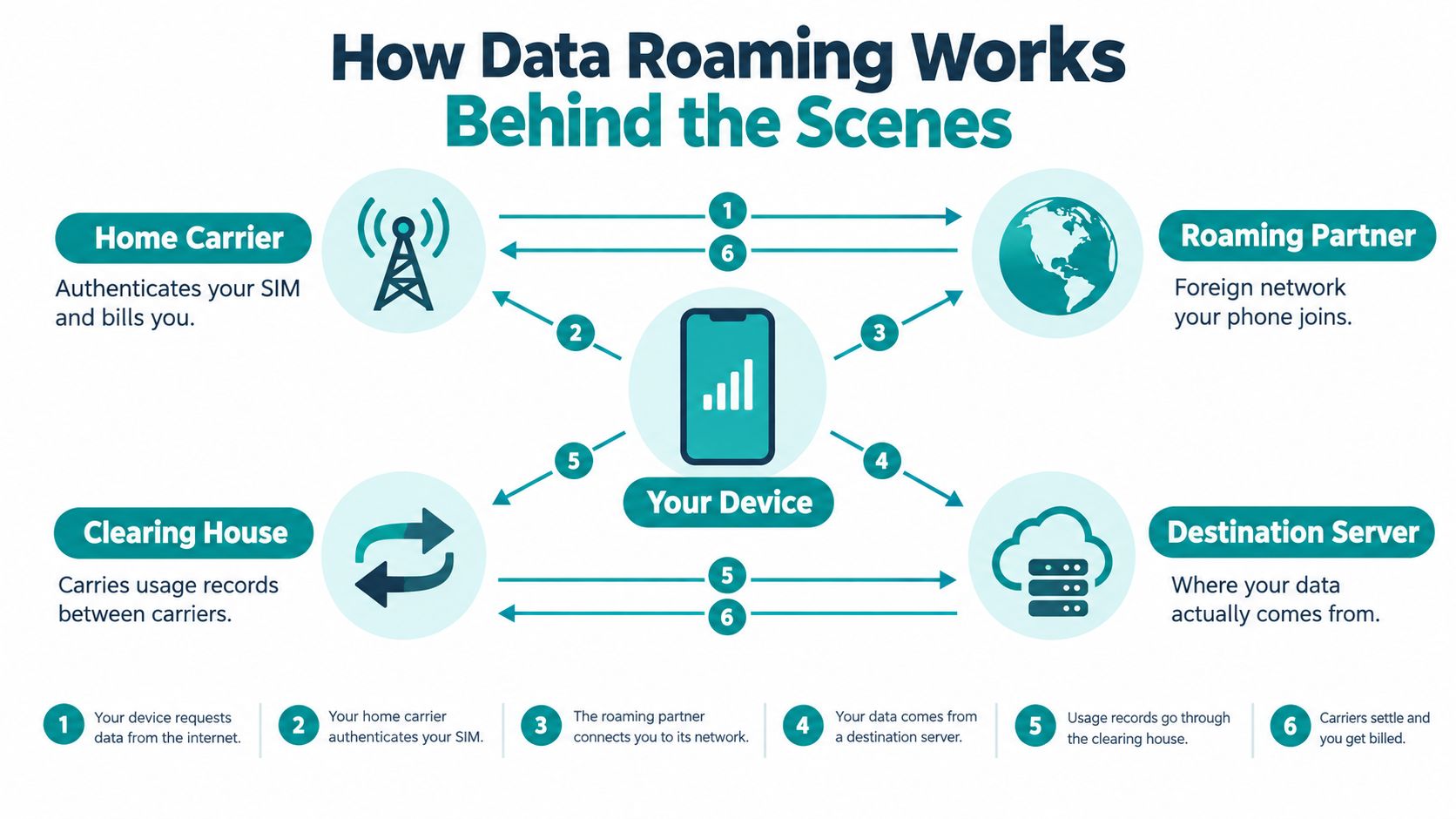
With home-routed traffic, the visited network transports packets to the home operator, which can preserve home IP services and policy controls. The route may be longer, however, which can add latency. With local breakout, traffic exits through the visited operator, potentially reducing latency for nearby services, but the operators need compatible security, charging, and policy arrangements.
That architecture explains why a strong signal doesn't guarantee a fast roaming experience. Performance also depends on authentication, partner capabilities, congestion, and the way traffic is routed. Before enabling roaming, read the plan details for destination limits, spending controls, and fair-use thresholds.
Why Roaming Prices Matter, The EU Experiment That Proved It
People use their phones differently when the price feels predictable. The European Union's Roam Like at Home reform took effect on 15 June 2017, ending retail roaming surcharges for periodic travel within the EU and European Economic Area, subject to fair-use rules. Customers could use included domestic voice, SMS, and data allowances abroad under the regulated arrangement. The European Commission's roaming review documents the resulting change in behavior.
| Time Period | Change vs. Pre-Reform |
|---|---|
| Third quarter of 2017 | Data-roaming traffic increased 435% year on year, according to an independent European Parliament review |
| Third quarter of 2018 | Roaming data reached roughly twelve times the pre-reform level |
| Summer 2019 compared with summer 2016 | EU/EEA roaming-data use was seventeen times higher |
| Traffic using the new tariff in the third quarter of 2017 | Approximately 90% |
The European Commission also reported that roaming data use rose tenfold compared with the year before the reform. Those figures don't mean travelers suddenly became more dependent on maps or messaging. They show that travelers were more willing to use mobile data when the retail surcharge barrier was removed or reduced.
The practical lesson for your trip
When travelers believe every map refresh could create a separate charge, they keep cellular data off, wait for hotel Wi-Fi, or avoid useful online services. When their plan includes a clear allowance, they use navigation, messaging, email, and other services more freely.
That makes “what is data roaming” a pricing question as well as a technical one. Before departure, compare your destination, expected data use, trip length, and need for calls or SMS with the official terms of your carrier or travel-data provider. Don't assume that a policy applying in one region applies to your next destination.
Your Connectivity Options Compared
No single setup suits every traveler. The right choice depends on whether you need a home number, continuous navigation, local calls, predictable data, or only occasional internet access.
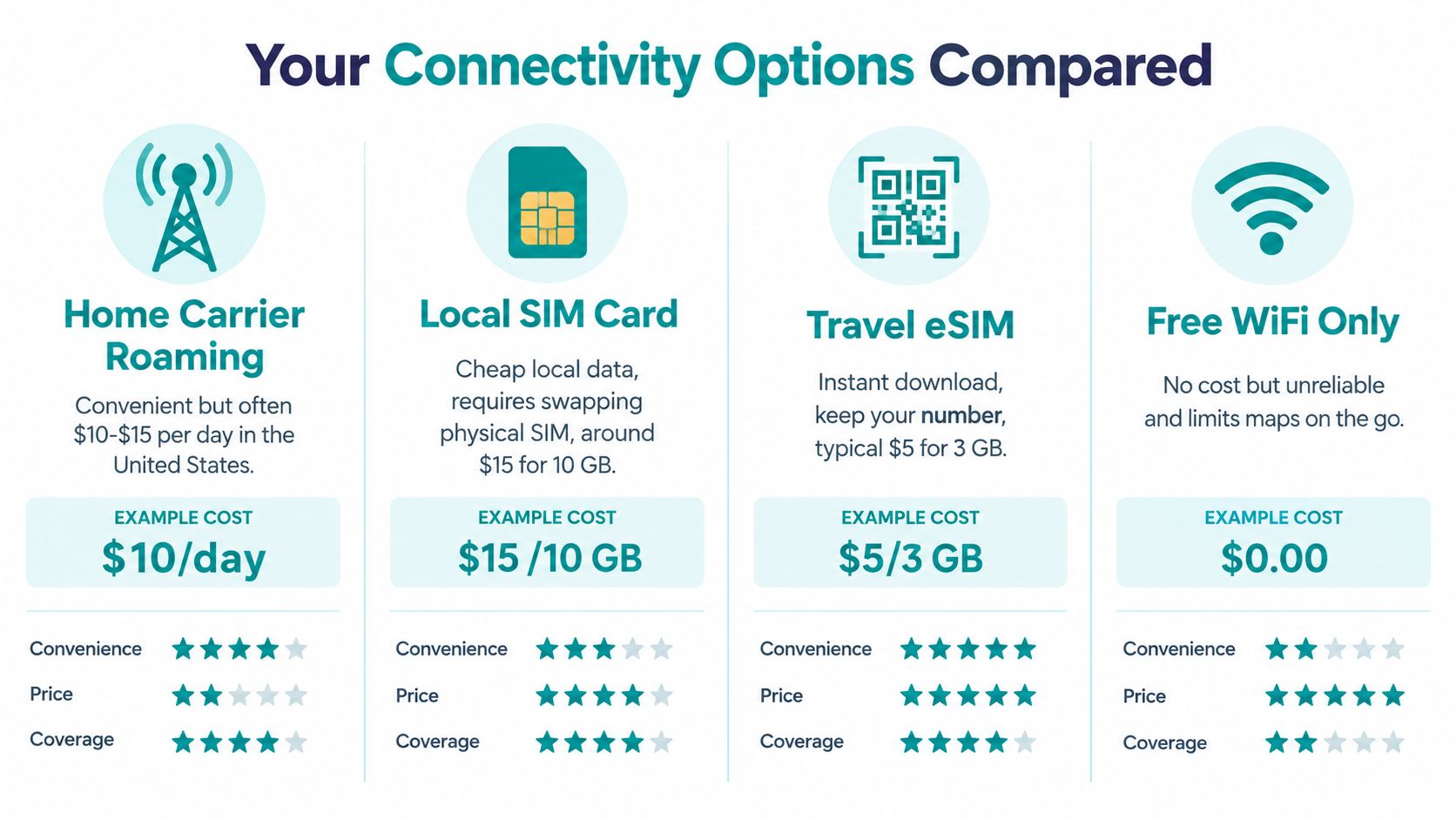
Home carrier roaming
Carrier roaming is convenient when you want to keep one number, receive ordinary calls and texts, and use your provider's support. It can make sense for a short trip when your plan explicitly includes the destination or offers a defined international option. Read the official carrier terms first, because allowances, destinations, spending controls, and billing methods vary.
Local physical SIM
A local SIM can suit a longer stay, especially if you need a local phone number, domestic calling, or local SMS. Your phone generally needs to be compatible with the destination's network bands. You'll also need to remove or replace a physical SIM, store the home SIM safely, and understand which line handles calls and data. For practical planning ideas, Madeira Remote's nomad SIM tips can help you think through the physical-SIM trade-offs.
Wi-Fi only
Wi-Fi works well if you'll spend most of your time in reliable hotels, offices, or cafés. It won't provide continuous service while you're walking between locations, navigating in a taxi, or coordinating a pickup outside a venue. Check whether the venue charges for access, and remember that calls or messages may still use cellular service if Wi-Fi calling isn't configured.
Travel eSIM
A travel eSIM is useful when you want prepaid cellular data across one or multiple destinations without swapping a physical card. Simsima sells data-only travel eSIMs, so they don't provide a local phone number, calls, or SMS. Plans use the networks listed in each plan's details, and Simsima doesn't claim a partnership with carriers. Review the destination coverage and your phone's eSIM compatibility before purchase. The eSIM versus roaming comparison can help you weigh convenience, coverage, and control.
A data-only eSIM also doesn't automatically eliminate charges on your home line. If that line remains enabled for cellular data, calls, SMS, or fallback behavior, you must configure it deliberately.
Dual-SIM Settings, The Setup Most Guides Miss
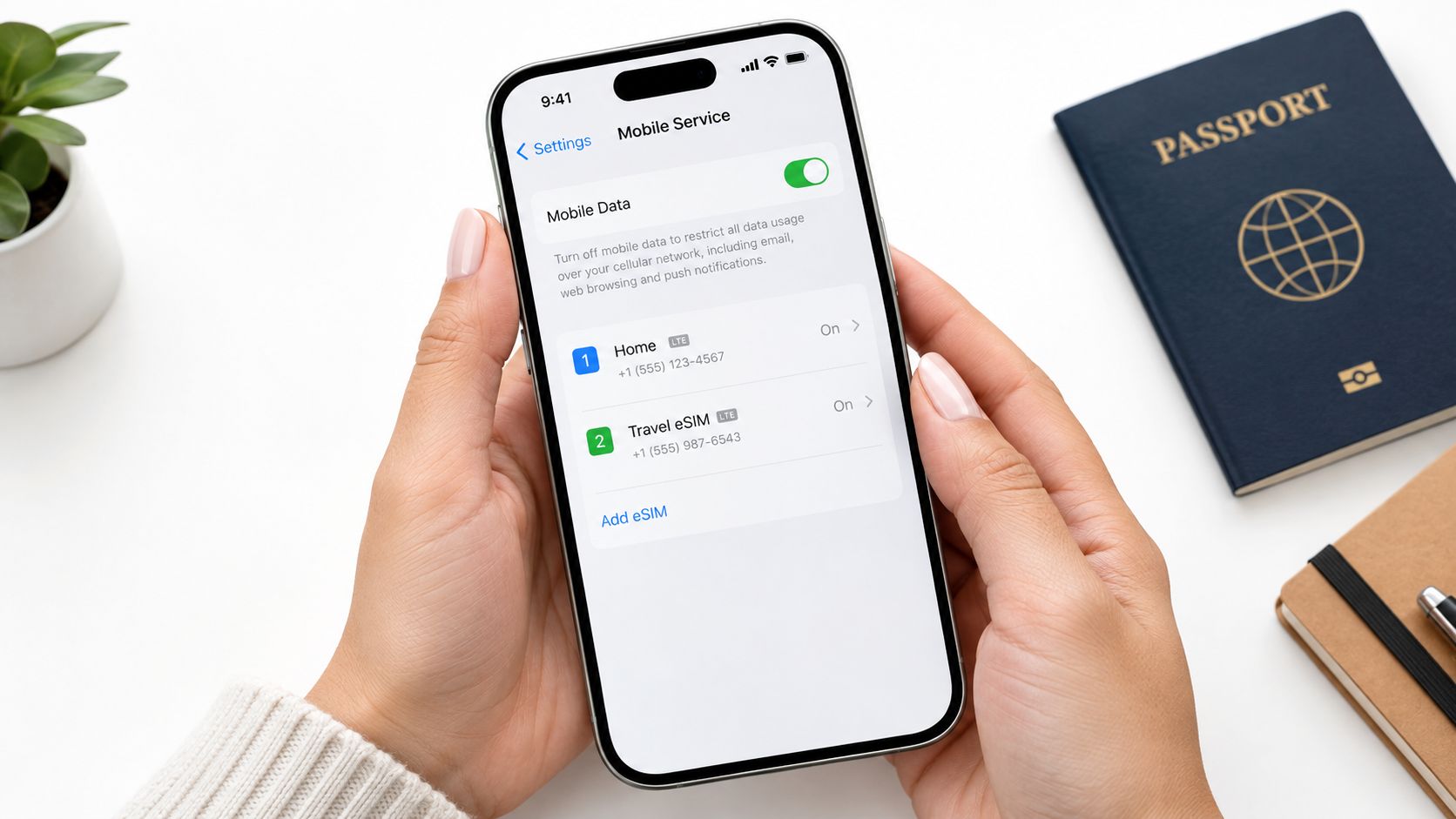
The most common dual-SIM mistake is assuming one roaming switch protects the whole phone. It doesn't always work that way. Your home line and travel eSIM need different settings when the travel eSIM connects through partner networks.
For a normal home carrier line, turn Data Roaming off if you don't want that line to use foreign cellular data. Apple identifies this setting as the way to avoid roaming charges for that line. Your home line can remain active for calls and texts, but those services may still be chargeable under your carrier's international terms.
On iPhone
Open Settings, select Cellular or Mobile Data, then choose the home line. Turn Data Roaming off for that line. Next, select the travel eSIM as the Cellular Data line and enable Data Roaming on that eSIM if its plan instructions require it. Turn off Allow Cellular Data Switching if you don't want the phone to move data to another line.
Apple's iPhone guidance for international eSIM use explains that the data line must be selected deliberately. The exact menu names can vary by iOS version and device.
On Android
Open Settings, then look for Network & Internet, Connections, or Mobile Network. Select the home SIM and disable Data Roaming. Choose the travel eSIM for mobile data, then enable Data Roaming on that line if the plan connects through partner networks. Android menus vary by manufacturer, so check the current instructions for your phone.
The safe pattern: Home line selected for calls if needed, home-line roaming off, travel eSIM selected for data, travel-line roaming on when required.
Use the dual-SIM phone setup guide for device-specific considerations, then test the configuration before departure while connected to Wi-Fi.
Installing and Activating Your Travel eSIM
Install your travel eSIM before leaving home, while you have dependable Wi-Fi. Preparing it in advance avoids trying to scan a QR code in a crowded arrivals hall with weak airport connectivity.
Simsima offers plans for 190+ destinations. On iPhone running iOS 17.4 or later and on Android, you can use the one-tap Smart Link installation. If that option isn't available, use the QR code provided for the plan. Installation adds the eSIM to your phone, but it doesn't mean the plan has started.
The activation detail travelers miss
For Simsima, the eSIM activates automatically when it first connects to a local network at your destination. Installing it isn't activation. That distinction matters because an eSIM installed over Wi-Fi at home hasn't yet connected to the destination network. Simsima support replies within 24 hours, and top-ups are available through your Simsima account.
At arrival:
- Select the travel eSIM as the Cellular Data or Mobile Data line.
- Enable Data Roaming on the travel line if the plan requires it.
- Keep Data Roaming off on the home line.
- Disable automatic cellular-data switching.
- Check that the travel eSIM connects to one of the networks listed in the plan details.
The travel eSIM setup instructions can help you match these steps to your device. Simsima offers a refund within 14 days if the eSIM hasn't been activated. Installing it doesn't count as activation, but connecting to a local network at the destination does, so review the applicable terms before changing your setup.
Frequently Asked Questions About Roaming
Will roaming charges appear immediately on my bill?
Not necessarily. Carriers may process and batch usage records, so roaming activity can appear after your trip rather than at the moment you use Maps or email. Monitor your carrier account while traveling and don't treat the absence of an immediate notification as proof that no charge is accumulating.
Is it safe to keep my home line active with Data Roaming off?
It can be safe for cellular data, provided you've selected the correct line and disabled roaming on the home SIM. Your home line may still receive calls or SMS, and those services can have separate charges. Turn off cellular fallback and background activity where appropriate, and confirm the carrier's official international terms before departure.
Can I make emergency calls with a data-only eSIM?
A data-only travel eSIM doesn't provide voice service, a local phone number, or SMS. Keep your home line available for voice and emergency calling where your device, carrier, and destination support it, and check official local guidance before relying on any particular calling arrangement. Don't assume an internet data plan replaces cellular voice access.
Which option fits my trip?
Use carrier roaming when keeping your number and ordinary calls or texts matters most and your plan clearly covers the destination. A local SIM may suit a longer stay or a need for local calling, while Wi-Fi only works best when you'll remain near dependable hotspots. A travel eSIM suits prepaid cellular data across one or multiple destinations without replacing the physical SIM, but you should verify device compatibility and the networks listed for the plan.
For a normal carrier line, turning off Data Roaming is the practical default when you don't need foreign cellular data. For a travel eSIM, the opposite may be necessary on that specific line. Review how to turn off roaming on iPhone and how to avoid roaming charges before you leave.
Simsima offers prepaid, data-only travel eSIMs for 190+ destinations, installed over Wi-Fi through Smart Link or a QR code and activated when the eSIM first connects to a local network abroad. Visit Simsima to review the networks and plan details for your destination, then set roaming on for the travel line and off for your home line before departure.






#data roaming#travel eSIM#roaming charges#international travel#eSIM setup

Dimitri MorvanFounder
Founder of Simsima. A passionate traveler based in Barcelona, he helps travelers stay connected without breaking the bank on roaming fees.
LinkedIn