Your creator kit,
ready to post
A real purchase demo, animated stickers, vertical backgrounds, transitions and logos. The visuals carry no text, so they work in any language.



What’s in the kit
Everything a travel creator needs to feature Simsima in a few minutes of editing.
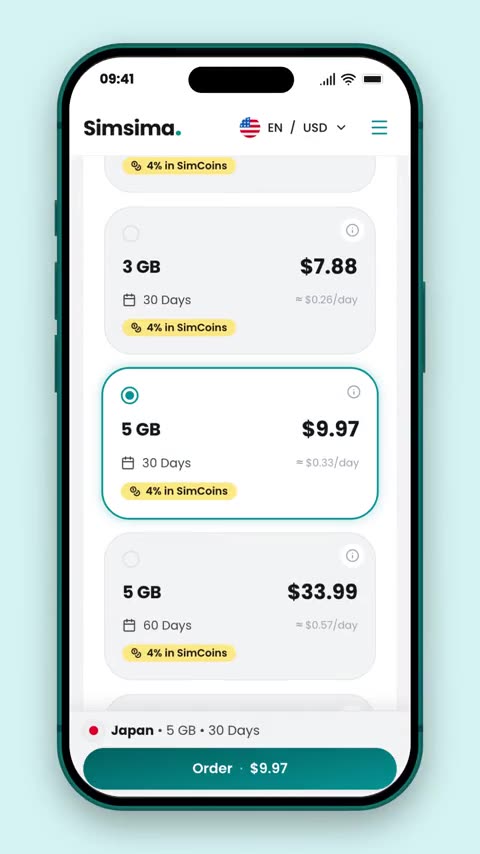
Purchase demo
The real checkout on simsima.io, in a phone frame.
Animated stickers
Cashback, signal, eSIM installed, destination pins…
Vertical backgrounds
Travel photos and brand colours, 9:16, up to 4K.

Transitions, intro, end card
Branded moments to open, link and close your video.
What to say about Simsima
Use your own words. Everything on the left is true for every plan.
Say it
- 190+ countries and regions, plus regional and global plans.
- Delivered instantly by email; install it by scanning a QR code or opening the link.
- Install it before you leave, connect as soon as you land.
- No roaming fees: one price for the plan, nothing added to the bill at home.
- Data only, so you keep your usual number: WhatsApp, iMessage and calls keep working.
- Top up the same eSIM without reinstalling it.
- Buying through your link earns 4% back in SimCoins (100 SimCoins = €1), valid for 12 months.
Avoid it
- Prices: they change daily and vary by country and currency. Say “check today’s price”.
- “Unlimited”, unless you have checked that plan’s details on the site.
- A phone number, calls or SMS: plans are data only.
- “Works on any phone”: it needs an eSIM-compatible, carrier-unlocked phone.
- Speeds, coverage or network names you haven’t seen on the product page.
- “Free”: cashback is earned on a purchase.
Your link, your code
Your link comes first
A viewer who buys through it gets 4% cashback, and the sale is credited to you.
A code replaces the cashback
A personal code gives a discount instead of the cashback. The two don’t combine.
Codes need your link
A personal code only works for viewers who arrived through your link. Keep it in your bio, description or pinned comment.
Other codes are refused
Codes found elsewhere (site banners, coupon sites) don’t work on your viewers’ purchases.
The reel that works
Start with a real moment
Landing somewhere new, needing a map, a ride or a message home. Then the question: “Which eSIM do I use?”
Show the proof
Show the purchase on screen with our demo, or record your own. Add one or two benefits in your words.
Point to your link
“Link in bio”, or in the description, with our end card. Label the post as an ad (#ad).
Download the assets
Pick a family, choose your variant, download. Every file is free to use in your Simsima content.
95 files in 1080, with keyed MP4 animations. Transparent .mov files and other sizes are below.
Purchase demo
The real purchase flow on simsima.io in an iPhone frame: pick a destination, choose a plan, reach the payment step. Around 17 seconds.
- Real prices and plans, straight from simsima.io
- Vertical 9:16 for Reels, TikTok and Shorts, or 16:9 for YouTube
- Transparent background: drop it over your own footage
Using the files
A few minutes of editing, in any app.
Transparent .mov
Drop straight onto your timeline in Premiere Pro, Final Cut Pro, DaVinci Resolve or CapCut desktop.
Keyed .mp4
In CapCut mobile: add as an overlay, open Chroma key, pick the magenta (or green) background.
Safe zones
Keep stickers out of the top 14% and bottom 20% of a vertical frame, under the apps’ buttons.
Transitions
Place the dot between two clips and cut at its midpoint, when the colour fills the screen.
Logo
Dark logo on light backgrounds, light logo on dark ones. Don’t recolour, stretch or rotate it.
Disclosure
Use your platform’s branded-content label and a clear #ad, as the rules where you post require.
Caption ideas
Adapt them freely and translate them into your language.
“Landed, scanned, online. My travel eSIM is in my bio, and you get 4% back on it.”
“No SIM shop, no roaming bill. Here’s the eSIM I use on every trip (link in bio).”
“I set up my data before I even packed. Simsima eSIM, link in bio.”
Need a custom asset?