-5% on your order in the app
Google Search, Gmail, Google Maps and YouTube are generally inaccessible from mainland Chinese networks without circumvention tools, while Hong Kong and Macau are governed separately and must be checked on their own terms.
But if your phone has internet access and your Google account still works, why won't your inbox open? That's the gap behind the question “Is Google banned in China?” For travelers, the useful answer isn't just about Google's status. It's about which services your actual connection can reach, and whether you can finish your trip or workday when it can't.
Prepare around the tasks you need to complete: finding your hotel, retrieving a reservation, contacting colleagues and signing in to important accounts. A connection that supports browsing isn't necessarily a connection that supports your Google-dependent routine.
Which Google Services Work in Mainland China
Google Search, Gmail, Google Maps and YouTube generally don't work reliably on ordinary mainland connections. Blocking affects individual services and their supporting domains, so an app opening doesn't mean its searches, messages or downloads will complete.
Trip.com's Google Maps guidance describes the practical failures travelers encounter across Google services, including unavailable search results, map data and video playback. Treat access as something to verify, not something included automatically with hotel Wi-Fi or a mobile data plan.
Typical experience of core Google services on mainland networks
| Service | Typical mainland experience | Preparation before departure |
|---|---|---|
| Google Search | Often times out or fails at DNS | Save key addresses and use local search tools |
| Gmail | Inbox and sending often fail | Export key emails and set a non-Gmail contact |
| Google Maps | Map tiles and directions often fail | Download offline maps for each city where available |
| YouTube | Videos often will not play | Download content before you leave |
| Google Drive and Docs | Often inaccessible | Store essential files offline |
| Google Play | Downloads often fail | Install required apps before departure |
| Google Scholar | Generally inaccessible | Arrange library or journal access in advance |
Google moved its search operation out of mainland China after its 2010 censorship dispute with Beijing, as documented in Reuters' account of Google's China history, but today's access problem isn't a simple ban on your account.
Prepare for the task, not just the app
For navigation, don't assume an offline download includes every feature you normally use. Check that your chosen mapping app supports downloads for your destination, then save the hotel's address in Chinese as text and a screenshot.
For work, a file listed in Drive isn't necessarily stored on your device. Open the local copy with the connection disabled, and export important Docs into a format your installed software can read.
Packing rule: If losing access would leave you unable to travel, pay, communicate or work, carry a usable copy outside Google's online services.
Messaging needs its own check. Our guide to WhatsApp in China helps you assess another common dependency rather than assuming a non-Google app will automatically work.
Use the table as a digital packing checklist. Results can change by network and period, so someone else's successful login doesn't establish what will work on your phone.
How the Block Works on Your Phone
Think of the internet as a postal system. Your phone addresses a request, networks carry it, and the destination sends a reply. The Great Firewall acts like a sorting office that can misdirect, refuse or inspect that traffic.
The illustration shows how filtering can interrupt the journey rather than shut down Google itself.
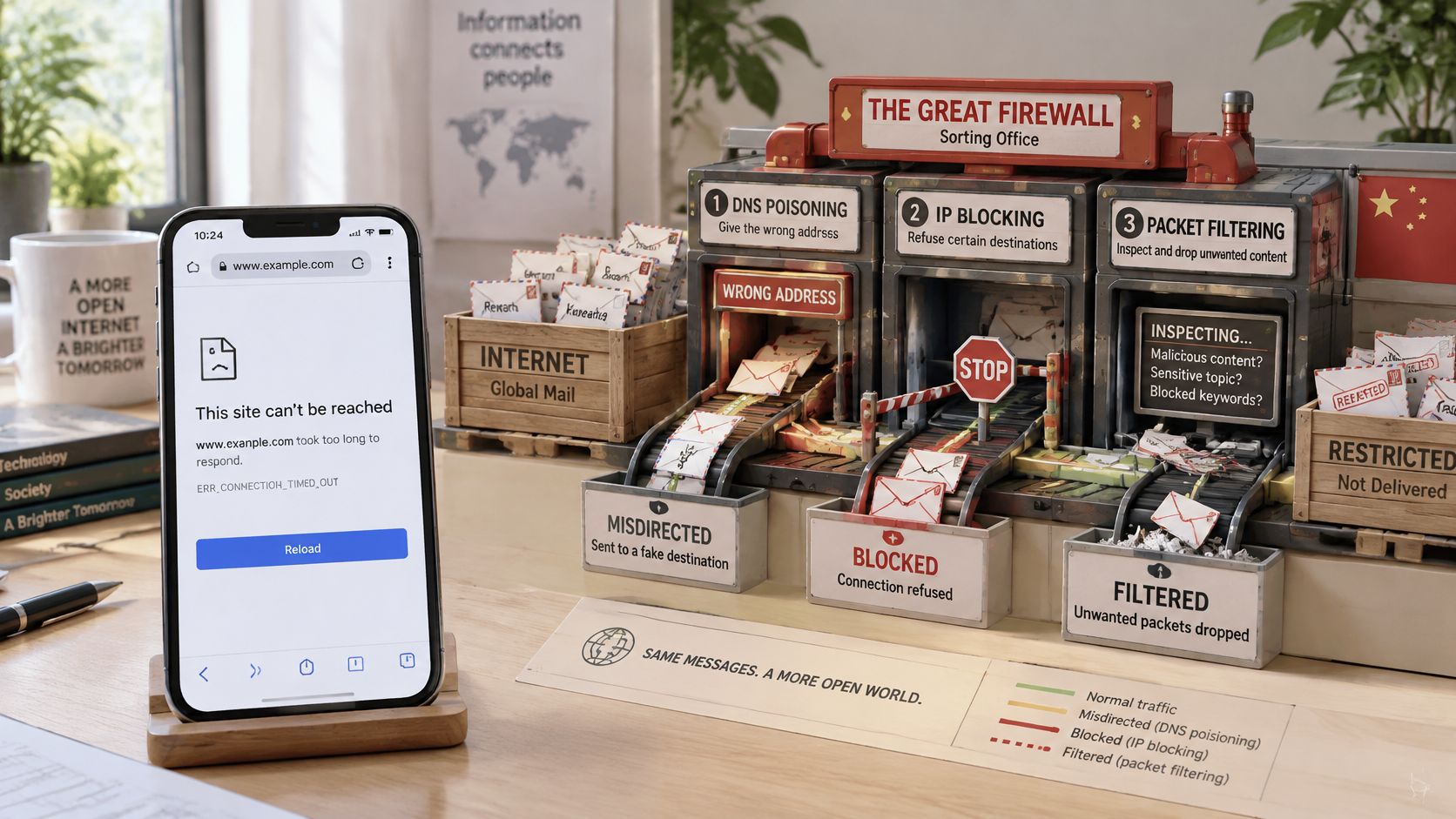
Where a request can fail
ThousandEyes' technical explanation of the Great Firewall describes several filtering mechanisms that can interrupt an otherwise valid connection:
- DNS poisoning supplies a forged address when your phone asks where a blocked service is located.
- IP blacklists cause routers to discard traffic headed toward blocked addresses.
- URL filtering and deep-packet inspection identify prohibited requests or recognizable connection details.
- Connection-reset packets terminate sessions that might otherwise continue.
DNS interference can therefore prevent your phone from reaching the correct destination before it establishes a secure HTTPS connection. Correct name resolution doesn't guarantee success either, because another filtering layer can stop the traffic afterward.
If you manage work systems and want to distinguish lookup failures from connection failures, SiteAlive's name resolution basics for DevOps teams provides useful background. Changing browsers won't resolve every kind of network-level block.
This video provides additional context for the filtering system.
What the signal indicator doesn't tell you
Full bars mean your phone can reach the mobile network, not every internet service. Likewise, joining Wi-Fi doesn't prove that Gmail or Maps can exchange data through it.
Test the application's actual function: send a message, retrieve a document or request directions. Merely seeing a familiar app screen can be misleading if it's displaying cached information.
A foreign-routed connection may behave differently because its traffic takes another path. The carrier's routing, terms and applicable rules determine that behavior; no connection should be treated as guaranteed.
Mainland China, Hong Kong and Macau Compared
Treating China as one internet environment is the planning mistake that breaks the most itineraries. Mainland China is where you plan around Great Firewall filtering, while Hong Kong and Macau sit under separate jurisdictions with their own internet conditions.
GoMayu's China internet guide distinguishes mainland access problems from account restrictions and warns against applying mainland advice automatically to Hong Kong or Macau. Your itinerary matters as much as the country name on the booking.
Google access by location
| Location | Typical Google access | Internet context | What to confirm |
|---|---|---|---|
| Mainland China | Search, Gmail, Maps and YouTube generally blocked without circumvention | Great Firewall filtering across most networks | Test each service on your actual network |
| Hong Kong | Generally reachable; Google relocated its search operation here | Outside the mainland filtering system | Whether a roaming or cross-border plan routes traffic through mainland networks |
| Macau | Generally reachable on local networks | Separate jurisdiction with its own internet conditions | Each Google service you depend on, since behavior can differ by network and by year |
Plan around the border crossing
Hong Kong's place in Google's search history explains why travelers treat it as an exception. That history still doesn't guarantee every Google application works on every connection there, so test the services you need once you arrive. Macau sits in the same position: local networks generally reach Google, but a work login or a deadline deserves a real check rather than an assumption.
A phone that worked in Hong Kong can lose Google access after you cross into mainland China.
If you're traveling from Hong Kong into Shenzhen or Guangzhou, prepare the mainland portion before crossing. Keep the onward address, train information and local contact details available without a fresh Google request.
Check whether your data plan covers every jurisdiction on the itinerary, too. Geographic plan coverage and access to a particular website are separate questions: a plan can provide data in a destination without promising unrestricted Google access there. The practical rule is to match each leg of the trip to the services you need on it, then choose a connection strategy leg by leg.
Choose Your Connection Strategy
The useful question isn't whether you can access Google. It's which critical services you need, through which network, with what legal and practical fallback.
Choose according to the consequences of failure. Missing entertainment is inconvenient; losing access to a client document or urgent email can prevent you from working.
Connection strategies compared
| Strategy | Google access | Main trade-off |
|---|---|---|
| Local networks and Chinese alternatives | Limited for Google services | Google-dependent workflows will break |
| Employer or institution-approved connection | Determined by the approved setup | Available only if your organization provides it |
| International roaming or travel eSIM | Determined by carrier routing and terms | Not a guaranteed bypass; verify before departure |
Match the connection to your workload
Local networks and Chinese alternatives suit travelers who can operate without Google. Prepare tools such as Baidu Maps, Amap and WeChat, and learn the functions you'll need before relying on them for navigation or communication.
For business travel, ask your employer or institution for its approved arrangement. Have IT confirm support for Gmail, Drive, Meet and any workplace login dependencies, rather than assuming that a connected laptop means a functioning Google Workspace setup.
International roaming or a travel eSIM can use a different traffic path, but installation alone doesn't remove restrictions. Beijing Tourism's traveler connectivity guidance explains why overseas routing can produce different results from local access without guaranteeing them.
Our Simsima China travel eSIM is a mobile data option to consider, not a promised way around restrictions. Confirm current plan details and network behavior on the official site; our guide to using eSIMs in China also explains what the Great Firewall blocks and how travel eSIMs can behave differently.
Account for legal and operational limits
Chinese rules require approval for cross-border internet access services; Gizmodo's China VPN guidance cites government guidance warning that unapproved VPN use can carry risks including fines, device confiscation or detention, and notes that many VPNs are themselves blocked.
For destination-specific preparation, use our VPN planning guide for China. You can also compare VPN providers for everyday use through Statlyst, but general features or rankings don't establish legality or availability in mainland China.
List the services you can't do without, assign a network and fallback to each, and recheck them shortly before departure. Choose the strategy that supports those tasks, not the one making the broadest access claim.
How to Prepare Before You Fly
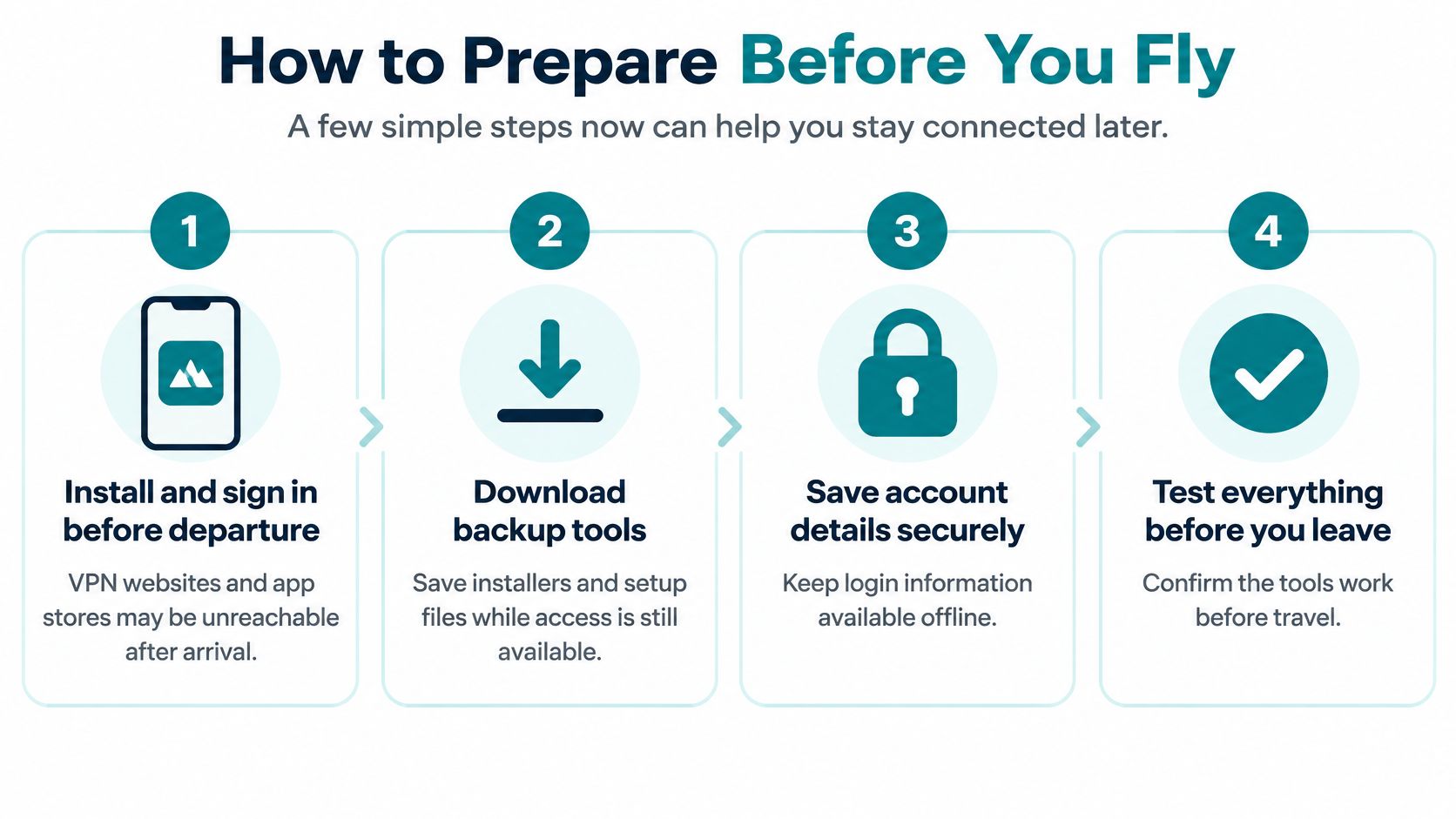
Build a departure kit that keeps working when a fresh download, password-recovery email or cloud lookup is not available. Save it somewhere obvious on your phone, and keep work material on your laptop too.
GFW Report's technical publication documents extensive domain filtering, which is why reachability should be treated as a per-service, per-network question rather than a single “Google is banned” verdict. Complete setup while you still have dependable access, then test the exact tasks you will perform.
Your departure routine
Install and sign in to lawful apps before departure. Get offline maps, translation packs, documents, your password manager and permitted work apps from official stores while they can still update, and stay within mainland China's legal and operational limits rather than assuming an app store or software site will load after arrival.
Export offline maps for every city on your route using an app that supports the destination, and save key addresses separately as text. This gives you a navigation fallback without requiring fresh map tiles or a search result.
Save boarding passes, hotel confirmations, translations and documents as local files and screenshots. Keep them in a clearly named travel folder so you will not need to search an inaccessible inbox at a check-in desk.
Arrange a non-Gmail contact method with your hotel, travel companion and relevant colleagues, then exchange a test message. The fallback only helps if the other person knows where to reach you and can use the same channel.
Generate account recovery or two-factor backup codes where supported, and store them securely offline, with a protected paper copy if appropriate. This keeps a bank or airline login from depending on a code delivered through a blocked Google service.
Test the full setup on hotel Wi-Fi and cellular data before leaving for China, or use another independent Wi-Fi connection if you are departing from home. Send a message, open a local document and check your recovery method so incomplete setup becomes visible before travel.
Disable data roaming on your home line and select your intended travel line for mobile data, while keeping the home line available for SMS if needed. If a travel eSIM is part of the plan, set up and label the Simsima China eSIM before departure, and check your home carrier's call and messaging terms because disabling data roaming does not settle every possible charge.
The visual checklist condenses the app, document and account-preparation tasks.
Make offline mean genuinely offline
Turn off connectivity and open your saved travel folder. A cloud shortcut, email attachment preview or recently viewed document is not enough unless you can still retrieve its contents with the network off.
Keep login information in a secure password manager configured for offline use, rather than an unprotected screenshot alongside your boarding pass. Confirm that you know the device passcode and can open the password manager without an online recovery step.
Before you pack: Ask whether you could reach the hotel and contact someone if your Google apps stopped updating.
Pre-departure testing confirms readiness, not future access through a different route. Choose the connection for the services you need: daily work belongs on the lawful route most likely to reach it, while rare needs can rely on offline files and a fallback contact.
Fixing Common Problems After You Land
Gmail not loading or refusing to send is a common sign that your current route can't reach the service. Don't immediately reset your password or delete the account from your phone, because either action can create an additional sign-in problem.
Start by checking whether a locally accessible website loads. Then use the symptom table to choose a practical response rather than repeatedly refreshing the same blocked request.
Symptoms, likely causes and fixes on the ground
| Symptom | Likely cause | Fix |
|---|---|---|
| Gmail will not load the inbox | Blocked service on this network | Use saved files and your non-Gmail contact |
| Maps shows grey tiles or no directions | Map data blocked | Use the offline maps you downloaded |
| YouTube videos will not play | Domain blocked | Play content downloaded before departure |
| Google Search times out | DNS or IP blocking on this route | Use your saved address list and local search tools |
| Two-factor code never arrives | Code delivery relies on a blocked Google service | Use the backup codes saved offline |
| VPN site or app store will not load | Access blocked after arrival | Use the tool you installed before departure |
Triage without making the problem worse
First, switch networks if you have another lawful, configured connection available. Turn Wi-Fi off when testing mobile data so you know which route the phone is using; switching between connections can resolve some route-specific problems quickly.
Next, use your offline material instead of delaying an immediate task. If Maps displays grey tiles, open the downloaded city map and saved hotel address rather than waiting for live directions.
For a missing verification code, identify the delivery method before diagnosing censorship. An SMS that never arrives may involve carrier service, while a code sent to Gmail requires access to the inbox; an offline authenticator doesn't need Gmail to display a code.
Finally, involve the appropriate outside party. Use your non-Gmail channel for account support, your employer's IT team for work access, or a carrier store for a mobile service problem; don't give staff your password or recovery codes.
An unreachable VPN website or app store isn't a dependable installation route after arrival. Use the permitted tool you prepared beforehand rather than searching for unofficial installers.
Test the actual task again after any change, including whether a message leaves the outbox. A fix on one network doesn't guarantee the same result on the next, so your real connection remains the deciding check.
Simsima offers travel eSIM data plans and guidance on how connectivity behaves in China, including why mobile data doesn't guarantee Google access. Visit Simsima to review your destination options, then match your connection to the services you need and keep a tested offline fallback.


#Google Banned China#Google China#China Internet Access#China Travel Tips#Great Firewall

Dimitri MorvanFounder
Founder of Simsima. A passionate traveler based in Barcelona, he helps travelers stay connected without breaking the bank on roaming fees.
LinkedIn