-5% on your 1st eSIMuntil October 31
You're standing in a Japanese airport arrivals hall with luggage in one hand and a connectivity decision in the other. One option sends you to a rental counter for a pocket WiFi device. The other lets you install a travel eSIM from your phone before takeoff and leave the airport without collecting or returning anything.
That choice isn't really about a data allowance. It's about airport logistics, battery life, device sharing, and the final return step. Pocket WiFi Japan rentals can be excellent for families and groups, but the physical hotspot becomes one more item to charge, carry, protect, and return. A travel eSIM is lighter and faster to arrange, but it requires a compatible phone and usually serves one device directly.
What Pocket WiFi in Japan Actually Is
A pocket WiFi unit is a battery-powered cellular modem with a small WiFi access point. It connects to a Japanese mobile network, then creates a private wireless network for your phone, tablet, laptop, or travel companion's device.
That distinction matters as soon as you land. You may need live navigation from the airport, translation at a railway station, a reservation confirmation, or mobile data while walking through a neighborhood where hotel WiFi is irrelevant. Japan's national tourism authority presents personal hotspot and pocket WiFi rental as a reliable way to stay connected across the country, with airport kiosks and online hotel delivery available through rental services (JNTO's connectivity guidance).
Practical rule: Treat the router as travel equipment, not as an invisible internet subscription.
The decision comes down to three physical questions:
- How do you receive it? Airport pickup is immediate, while hotel delivery can work better for late arrivals.
- How do you live with it? You'll keep it charged and close enough for your devices to use its WiFi signal.
- How do you return it? You'll need to meet the provider's deadline and use an approved counter, box, hotel shipping process, or other return method.
That's why a travel WiFi guide should never stop at coverage claims. The useful question is whether carrying a separate hotspot fits your itinerary. For a multi-city trip with several people sharing data, it may. For a solo traveler with an open phone, it may just add another object to lose.
How the Device Works and What It Can Do
Think of the hardware as two systems joined together.
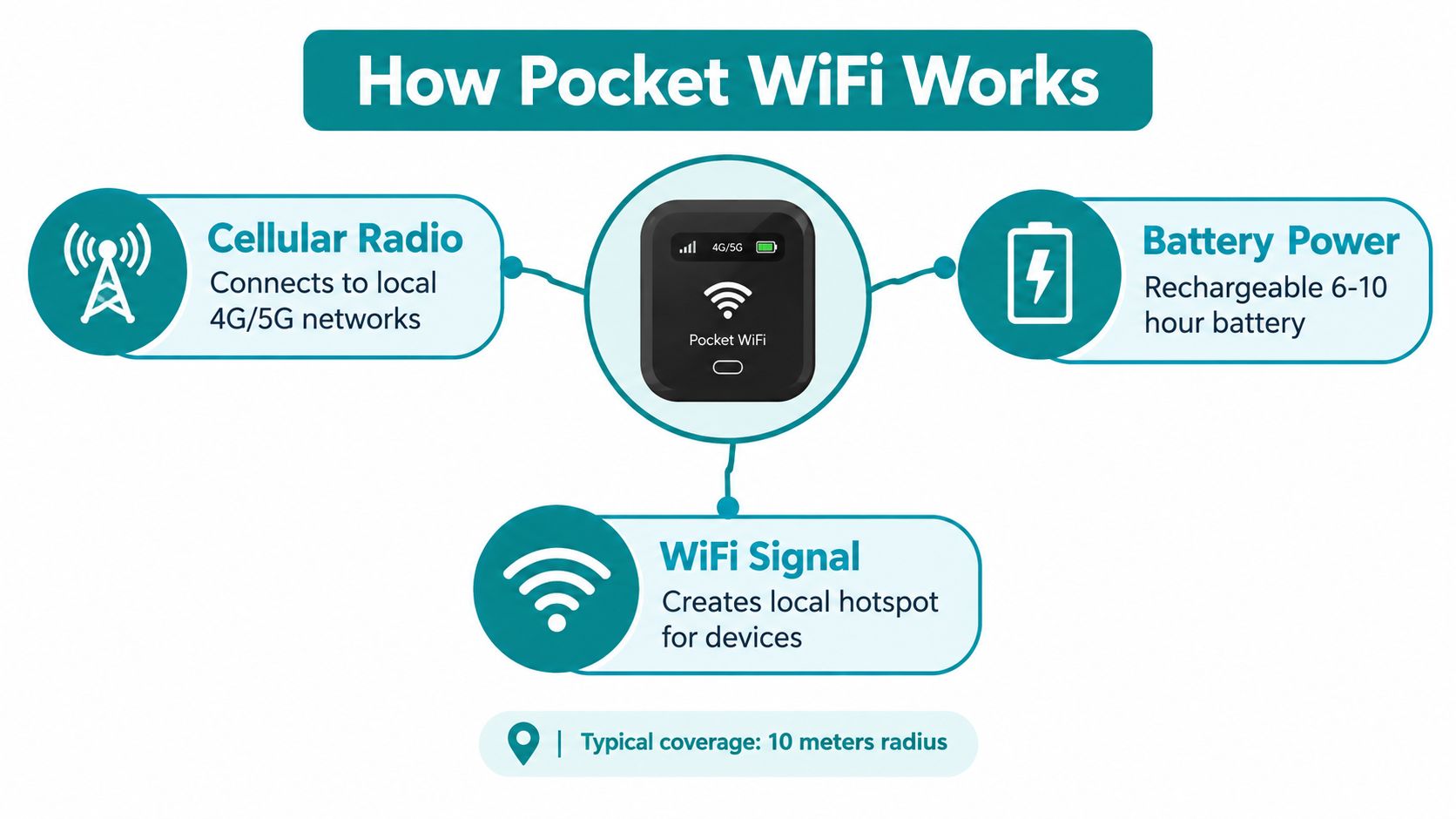
The cellular radio connects to the operator's 4G/LTE or 5G network. The WiFi access point shares that connection locally with your devices. A strong WiFi icon on your laptop only proves that your laptop can reach the router. It doesn't prove that the router has a strong cellular signal or enough network capacity.
Representative Japanese rental hardware supports 4G/LTE, theoretical peak speeds of up to 612 Mbps down and 37.5 Mbps up, 802.11a/b/g/n/ac, and as many as 14 simultaneous clients, according to the listed device specifications (eConnect Japan's rental hardware details). Those are ceiling figures, not a promise about your train ride, hotel room, or crowded attraction.
The specifications you'll notice
- Battery: Published rental specifications commonly indicate around 8 to 10 hours of continuous use, with a full recharge taking roughly 3 hours (Japan Experience's pocket WiFi specifications).
- Weight: Devices commonly fall around 90 to 140 grams, light enough for a day bag but still another item to remember.
- Shared capacity: A router can connect multiple clients, but that doesn't mean every connected device can run high-bandwidth tasks simultaneously.
- Network choice: A faster router can't repair weak indoor reception, congestion, mountainous terrain, or a provider's throttling policy.
For a plain-language explanation of how mobile broadband differs from ordinary local WiFi, Waymap's 5G connectivity guide is useful background. The practical takeaway is simple: pocket WiFi is a shared, battery-dependent substitute for putting mobile data directly on your phone.
Pocket WiFi vs Travel eSIM vs Other Options
Land in Japan after a long flight, collect a router at the airport, keep it charged all day, and remember to drop it in the return box before you leave. That is the actual trade-off with pocket WiFi. The data plan matters, but the airport counter, the battery, and the return process are what decide whether it feels convenient or annoying.
| Option | Devices supported | Setup location | Hardware to carry | Airport step |
|---|---|---|---|---|
| Rental pocket WiFi | Several phones, tablets, and laptops through one hotspot | Airport or hotel after pickup | Router and charging cable | Collect it, then return it |
| Travel eSIM | Usually the compatible phone, with phone-based sharing where supported | Before departure over WiFi | No separate device | No pickup or return |
| Local physical SIM | One phone, with phone-based sharing where supported | Airport shop, vending machine, or store | SIM card and possibly an adapter | Buy or collect it |
| Hotel or café WiFi | Devices within each location | Hotel, café, or public venue | No dedicated hardware | No rental step |
| Home carrier roaming | Your existing phone and plan | Before or during travel, depending on carrier | Your phone | No pickup or return |
Choose pocket WiFi for a group. That is its best use case. One router can keep several phones and laptops online without asking everyone to buy separate plans or check eSIM compatibility.
The downside is simple. The router is the product. If its battery dies halfway through the day, if someone leaves it in a café, or if the person carrying it walks off, everybody loses data at once. For solo trips, that is often needless hassle.
A travel eSIM is usually the cleaner choice for one person, or for anyone who wants mobile data working the moment the plane lands without a pickup counter or a return envelope. Simsima sells data-only travel eSIMs for 190+ destinations. You install one before departure over WiFi, and it activates automatically when your phone connects to a local network. On iPhone with iOS 17.4 or later and on Android, one-tap Smart Link installation is supported. A QR code is available otherwise. The service provides no local phone number, ordinary calls, or SMS, and support replies within 24 hours. An eSIM that has not activated can qualify for a refund within 14 days. Installing it alone does not count as activation. If you want plan details before you book, start with this best eSIM for Japan guide.
Local SIMs still work if your phone takes them and you do not mind swapping cards. Hotel and café WiFi are backups, not a travel plan. Home carrier roaming wins on convenience if your carrier charges a fair rate.
If you are deciding between pocket WiFi or eSIM for your trip, use a simple rule. Pick pocket WiFi for shared travel. Pick an eSIM for solo travel, lighter logistics, and one less thing to charge and return.
Booking, Pickup, Use, and Return Step by Step
Reserve online before departure and read the operational details before paying. Choose airport pickup or hotel delivery, then verify the exact terminal, counter, collection instructions, and opening hours on the provider's official site.
Narita offers prepaid SIM sales and pocket WiFi rental counters in the arrivals areas of all terminals. Those stores are generally open from around 7:00 a.m. to 9:00 p.m., according to JNTO's Narita Airport information. New Chitose also has prepaid SIM vending machines and pocket WiFi rental counters in the arrivals halls. Airport availability doesn't guarantee that your selected provider offers after-hours collection or same-airport return.
Before you fly
- Match the reservation to your itinerary. Enter your hotel details carefully if you're using delivery, and confirm whether the device will arrive before you check in.
- Save the confirmation offline. Airport WiFi may get you online, but you shouldn't depend on it to find a reservation email.
- Charge your backup battery. A router that starts the trip at full power is still likely to need help during a long sightseeing day.
- Read the return deadline. Some providers require posting by noon on the day after rental ends. Others require return by midnight on the final rental day. The provider's rule controls.
During the trip, use the router for navigation, translation, reservations, messaging, and cloud services. Turn off automatic photo backup and laptop updates when several devices share the connection.
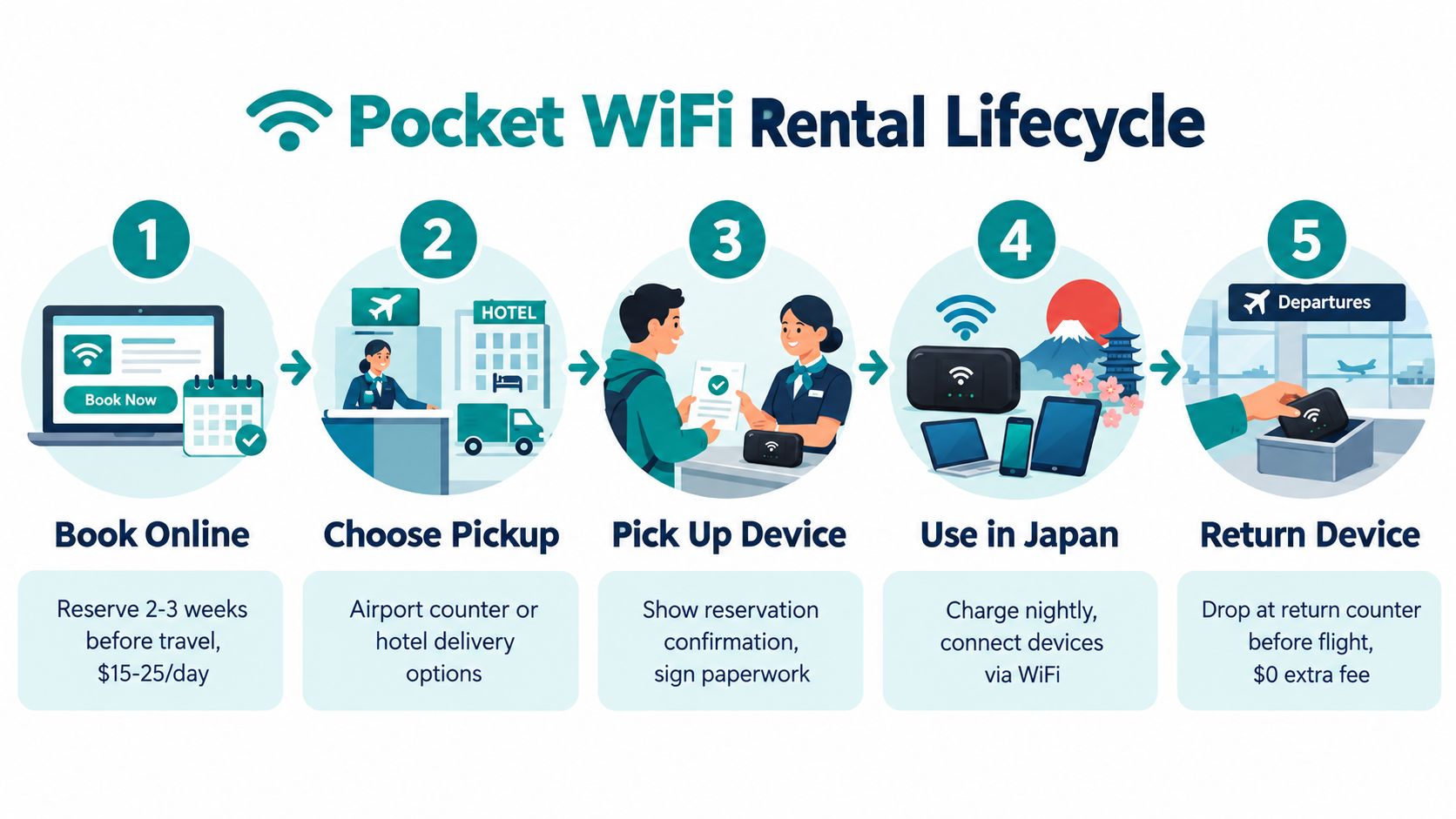
The return is where casual planning fails. Return boxes and mailboxes are generally outside airport security, so don't put the device in your bag and assume you can mail it after immigration. If you leave from a different airport, depart before a counter opens, or miss the box, ask whether the provider permits hotel staff to mail it and follow the official instructions. Late-return charges, replacement exposure, and shipping responsibility vary by provider, so check those terms before booking.
The Truth About Coverage Speed and Unlimited Data
Coverage, speed, and “unlimited” are three different promises. Treat them that way before you book.
A pocket WiFi can work brilliantly in Tokyo, on the Shinkansen corridor, and around major stations, then slow down inside a concrete building, on a rural road, or in the mountains. That is normal mobile-network behavior, not a sign that the router itself is broken. What matters in practice is whether your trip stays in dense urban areas or pushes into places where any mobile connection gets less predictable.
The bigger catch is the speed policy behind the word unlimited. Some rentals still apply fair-use limits, and one Japanese provider states that speeds are reduced after 3 GB of daily use until the end of the day (Japan Experience's specifications and fair-use information). A family sharing one hotspot can hit that faster than expected. Video streaming, cloud photo backup, laptop syncing, and app updates all pile onto the same connection.
Raw network performance also changes by operator, location, and time of day. Opensignal reported a Japan-wide average download experience of 54.7 Mbps for au in October 2024 (Opensignal's Japan mobile network experience report, October 2024). That does not mean you will get the same result at a packed airport, a festival, or a commuter-hour train platform. Peak-speed marketing matters less than real congestion.
Battery is part of the product. If the router dies at 4 p.m., your “unlimited” plan is useless until you recharge it. Bring a power bank, keep the unit out of heat, and move it closer to a window when indoor reception drops. For practical DigiDevice hotspot optimization tips, focus on device position and cutting background data.
Shared hotspot, shared convenience. Also shared battery, shared bottleneck, and one more object that must make it back to the return box.
Common Problems and How to Fix Them
Most pocket WiFi failures are manageable if you diagnose the physical setup before blaming the network.
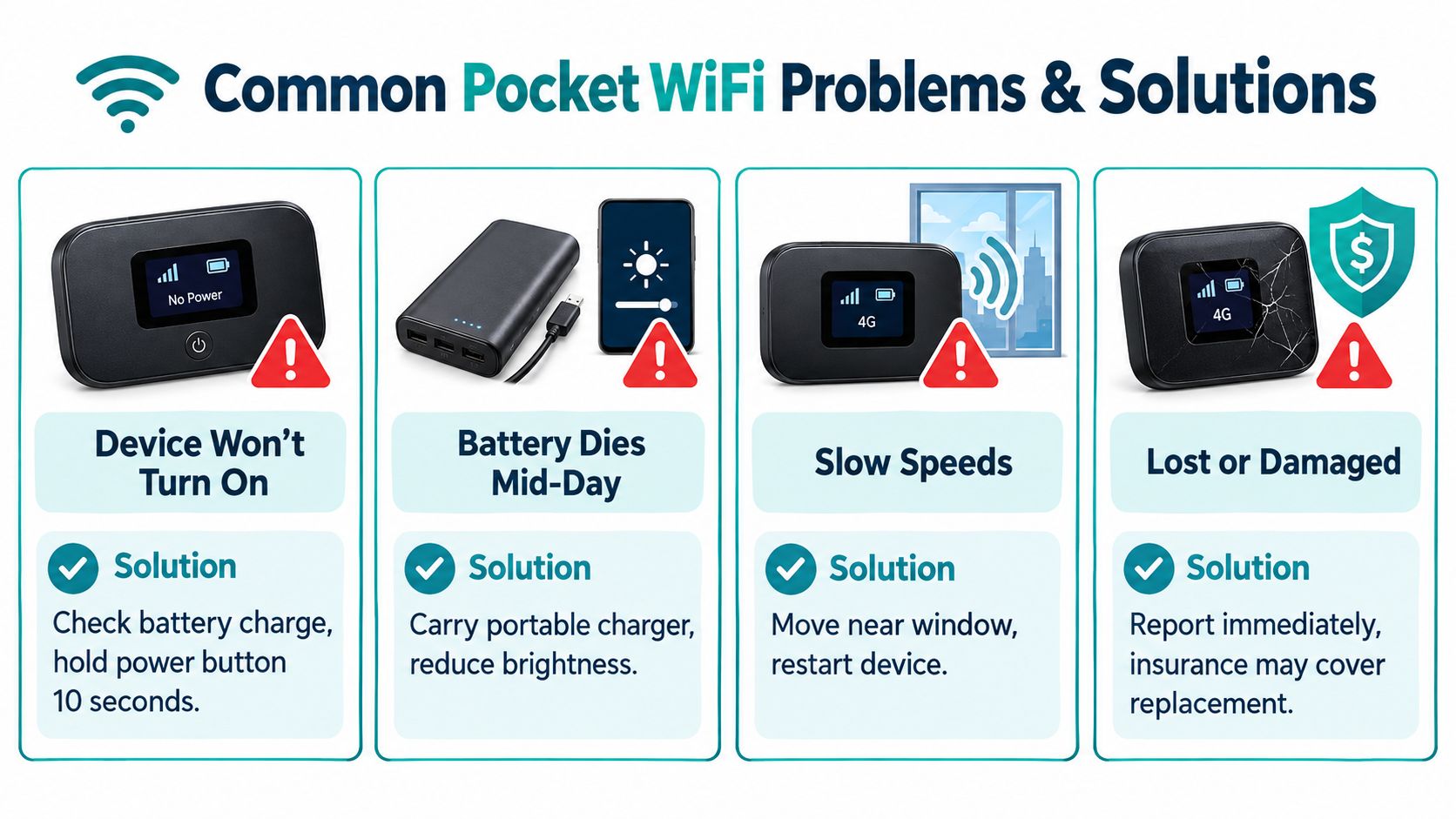
- Device won't turn on: Connect the supplied cable, try another power source, and hold the power button for 10 seconds. If nothing happens, contact the rental provider.
- Battery dies mid-day: Connect a power bank, reduce unnecessary screen activity, and disconnect devices that aren't using data. Don't wait until the battery reaches zero before troubleshooting.
- Speeds become unusable: Move near a window or outdoors, restart the router, and check whether several devices are syncing or streaming. If the issue continues, identify the underlying network and contact support.
- The device is lost or damaged: Report it immediately and read the provider's replacement or protection policy. Don't wait until the return deadline.
A missed return is a separate problem. If you're already away from the airport, don't guess at the mailing method. Ask the hotel whether staff can ship it, then follow the provider's official address, packaging, deadline, and tracking instructions. A device left in a hotel safe after checkout can create the same exposure as a device lost in transit.
Choosing the Right Option for Your Trip
For a solo traveler on a short city trip, choose a travel eSIM if your phone is not locked to a carrier and compatible. You won't collect equipment, share a battery, or find a return box.
For a family or group with several phones and laptops, pocket WiFi is often the more practical arrangement because one rental can share data across multiple devices. Keep a power bank with the person carrying the router, not in a suitcase.
For a business traveler, use the option that protects your workday. Pocket WiFi can provide shared access, but congestion and battery failure affect everyone on it. A travel eSIM on the work phone, possibly alongside roaming as a backup, avoids depending on one physical hotspot.
For a remote worker, a hybrid setup is the safest editorial choice. Use a direct cellular connection on the main phone and keep hotel WiFi or another approved backup available for meetings and uploads. Don't call a plan unlimited without checking its high-speed allowance and fair-use policy.

Pocket WiFi is the wrong call when your phone already has reliable carrier roaming, when you don't want a return deadline, or when you have an unlocked eSIM-compatible phone and can install data before departure. Check whether your phone will work in Japan before choosing hardware.
Frequently Asked Questions Before You Book
Does my phone need to be unlocked for a travel eSIM?
Yes, it needs to be compatible and free of carrier restrictions. You can keep your regular line for calls and texts when dual-SIM operation is supported, while using the travel eSIM for data.
What if I arrive after the airport counter closes?
Check the provider's official hours before booking. Hotel delivery, an approved locker, or a later pickup may be available, but airport rental counters aren't automatically open for every arrival.
Is pocket WiFi better for several devices?
Often, yes. One router can share data with phones, tablets, and laptops, but all users share its battery, cellular connection, and fair-use policy.
Can I return it from another city or after departure?
Possibly, depending on the provider. Confirm whether a different airport, return box, hotel shipment, or post-departure mailing method is accepted before you travel.
Simsima offers data-only Japan travel eSIMs that you can install over WiFi before departure, with automatic activation when the phone first reaches a local network. Visit Simsima to check the Japan option and decide whether avoiding airport pickup and pocket WiFi return logistics suits your trip.
#pocket wifi japan#japan esim#japan travel wifi#wifi in japan#japan connectivity

Dimitri MorvanFounder
Founder of Simsima. A passionate traveler based in Barcelona, he helps travelers stay connected without breaking the bank on roaming fees.
LinkedIn