-5% on your 1st eSIMuntil October 31

A modern 4G/5G phone from the US or Canada, free of carrier restrictions, will usually get data in Europe, but only after you confirm band compatibility, eSIM support, and a data plan that fits the trip. In the third quarter of 2019, almost 170 million Europeans roamed in another EU/EEA member state, showing that European networks can handle international travel, but your home plan still decides whether you can use them without extra roaming charges.
Your passport is ready, the charger is in the bag, and then the airport thought arrives: will my phone work in Europe, or will it become an expensive camera with no maps, messages, or boarding passes? The honest answer has four separate parts: the phone must support the local networks, it must be open to different carriers if you're changing SIMs, your carrier must allow roaming or your replacement plan must cover the destination, and your settings must assign data to the correct line.
Treat “works in Europe” as a test, not a guess. Finish the checks below before departure and you'll know whether to keep your home plan, add a carrier pass, install a regional eSIM, or buy a local SIM.
The Short Answer Before You Pack
A compatible phone and a usable phone plan are different things. A US or Canadian iPhone or Android device may connect to a European network, yet your carrier might block international roaming, exclude part of your itinerary, or limit data under its own terms. Conversely, a phone can be network-agnostic and still lack the LTE bands or VoLTE support needed for reliable service.
European mobile infrastructure is mature. Europe had 285 million 4G connections at the end of 2017, and 4G accounted for 42% of the region's mobile connections at that point, according to GSMA Intelligence's European mobile economy report. In the second quarter of 2025, EU mobile subscribers spent 44.5% of connected time on 5G, compared with 32.8% one year earlier, as reported by GSMA Intelligence. A modern international phone will usually find service in cities and along major transport routes, provided its hardware overlaps the local network.
The policy question comes first. EU and EEA subscribers generally receive “Roam Like at Home” access across participating destinations, while visitors using US or Canadian home carriers don't receive that protection automatically. The European Commission's roaming guidance also makes clear that fair-use conditions and destination exclusions matter.
Your practical result should be one of three answers: my home plan covers this trip, my phone passes and I'll use a separate data plan, or my device needs a local SIM, Wi-Fi, or replacement hardware.
The Compatibility Test You Should Run Before Departure
Run these five checks in order. Don't start by buying a plan, because an eSIM won't fix a locked phone or missing network bands.
Five checks that prevent airport troubleshooting
Identify the exact model and regional variant. Find the model number in Settings, on the original packaging, or through the IMEI record. “iPhone 15” or “Galaxy” isn't precise enough because regional variants can support different radios.
Confirm the phone is not locked to a carrier. An iPhone should show no SIM restriction in its cellular settings. Android unlock status normally comes from the original carrier. The FCC's explanation of phone unlocking is blunt on the important point: unlocking removes a software restriction, but it doesn't guarantee frequency or air-interface compatibility.
Match LTE and 5G bands with each destination. Check the networks you'll use, not an abstract list of “European bands.” Germany provides a useful example. GSMA network data lists Deutsche Telekom using LTE Band 3 at 1800 MHz and Band 20 at 800 MHz, while Vodafone Germany reports 90% territorial coverage in its network information at GSMA's Germany network page. A phone missing Band 20 may work well in a city on Band 3 but lose strength indoors or in rural areas.
Verify VoLTE support and provisioning. 3G shutdowns mean mobile data can work while ordinary voice calls fail. Ask the home carrier or travel-plan provider whether VoLTE is supported on your exact device and network combination.
Test the SIM or eSIM at home. Install the travel eSIM on Wi-Fi, check that it appears in cellular settings, and confirm which line will handle mobile data. If you're using roaming, ask the carrier to confirm international service before departure.
| Check | Where to Look | Pass Signal |
|---|---|---|
| Exact model | Settings, IMEI record, manufacturer page | Full model and regional variant identified |
| Carrier lock | iPhone cellular settings or original Android carrier | No SIM restriction, or carrier confirms unlock |
| LTE and 5G bands | Manufacturer specifications and destination operator pages | Overlap with a major local LTE band |
| VoLTE | Carrier support page or customer service | Device and line are provisioned for VoLTE |
| eSIM and setup | Simsima's supported-device checker and phone settings | eSIM installs, correct data line selected, test completed |
A successful connection in Paris proves only that the phone works with that network in that location. It doesn't prove coverage in rural Greece, Switzerland, the UK, or every other country on your itinerary. Validate each intended network before you fly.
Finding Your Phone's IMEI Model and Band List
The model number is the detail that turns vague reassurance into a real compatibility check. On an iPhone, open Settings > General > About and record the Model Number, IMEI, and EID if you plan to use an eSIM. Tap the model number if necessary to reveal the device identifier rather than relying on the marketing name.
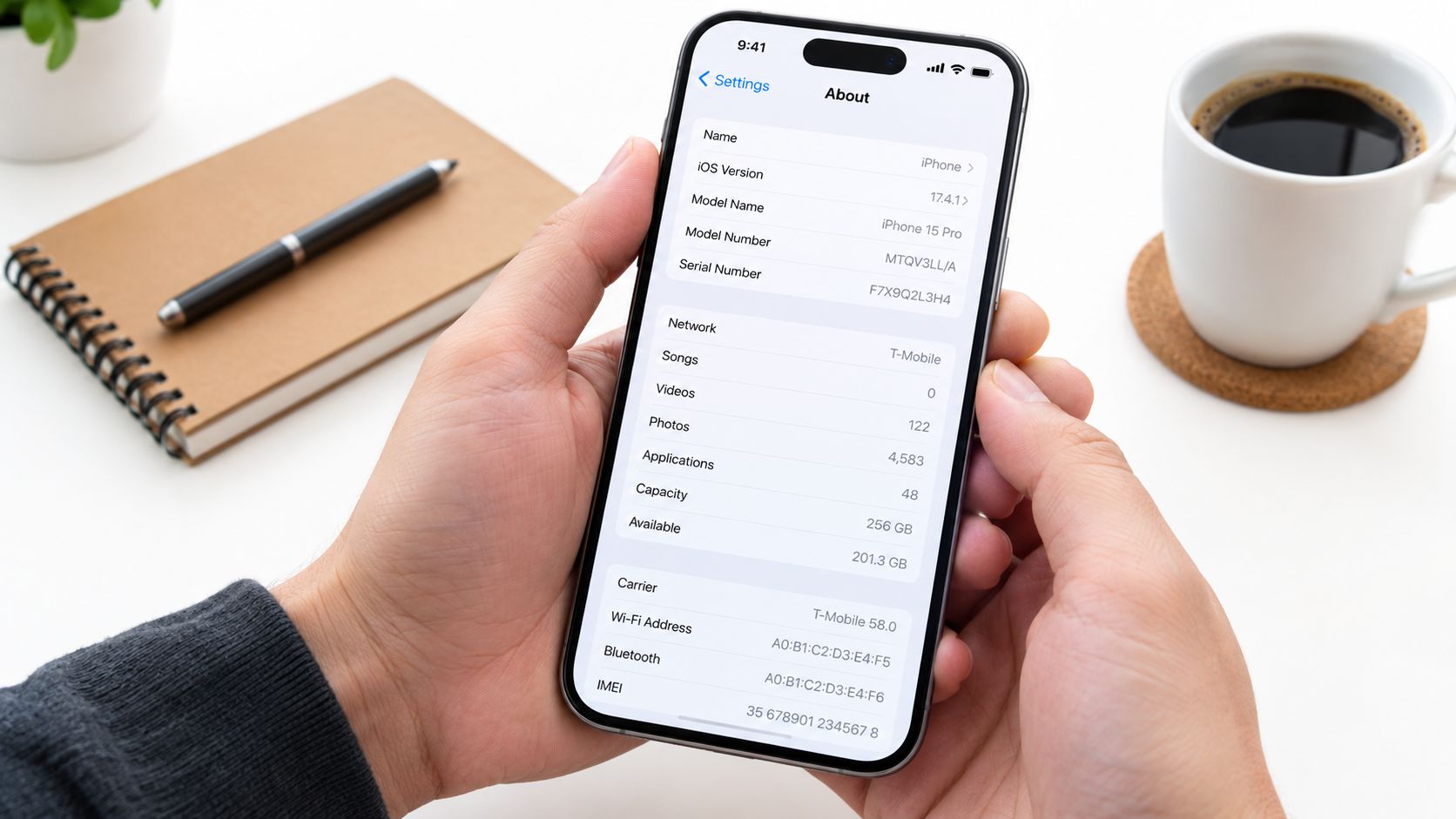
On Android, the path varies by manufacturer, but Settings > About phone usually exposes the model, IMEI, and regulatory information. Samsung, Google Pixel, and other brands may list several identifiers, so copy the complete model code. Search that exact code on the manufacturer's specifications page, not a retailer listing for a similar-looking version.
Why the regional variant matters
Two phones with the same retail name can carry different modem configurations. A US model may omit bands used more heavily in Europe, while an imported Asian model can lack important European LTE support. The missing band might not stop the phone from connecting in a major city, but it can reduce indoor or rural reliability.
Save screenshots of the model page and band list offline. A train station with weak service is a poor place to research technical specifications. Also record whether the phone supports eSIM, whether the IMEI is blocked, and whether the device is dual-SIM capable.
Practical rule: “Unlocked” answers the SIM-lock question. It doesn't answer the network-compatibility question.
Before takeoff, inspect dual-SIM settings. Many airport failures come from the phone assigning mobile data to the home line while the travel line is enabled only for calls. Set the travel line as the mobile-data line, decide whether the home line should remain active, and disable automatic switching if your phone offers that option.
Choosing How You Actually Get Data in Europe
There are three sensible paths for a US or Canadian traveler: keep the home plan with international roaming, buy a local physical SIM, or install a regional travel eSIM. The right choice depends less on phone brand than on how many countries you'll visit, how much you rely on your regular number, and how long you'll stay.
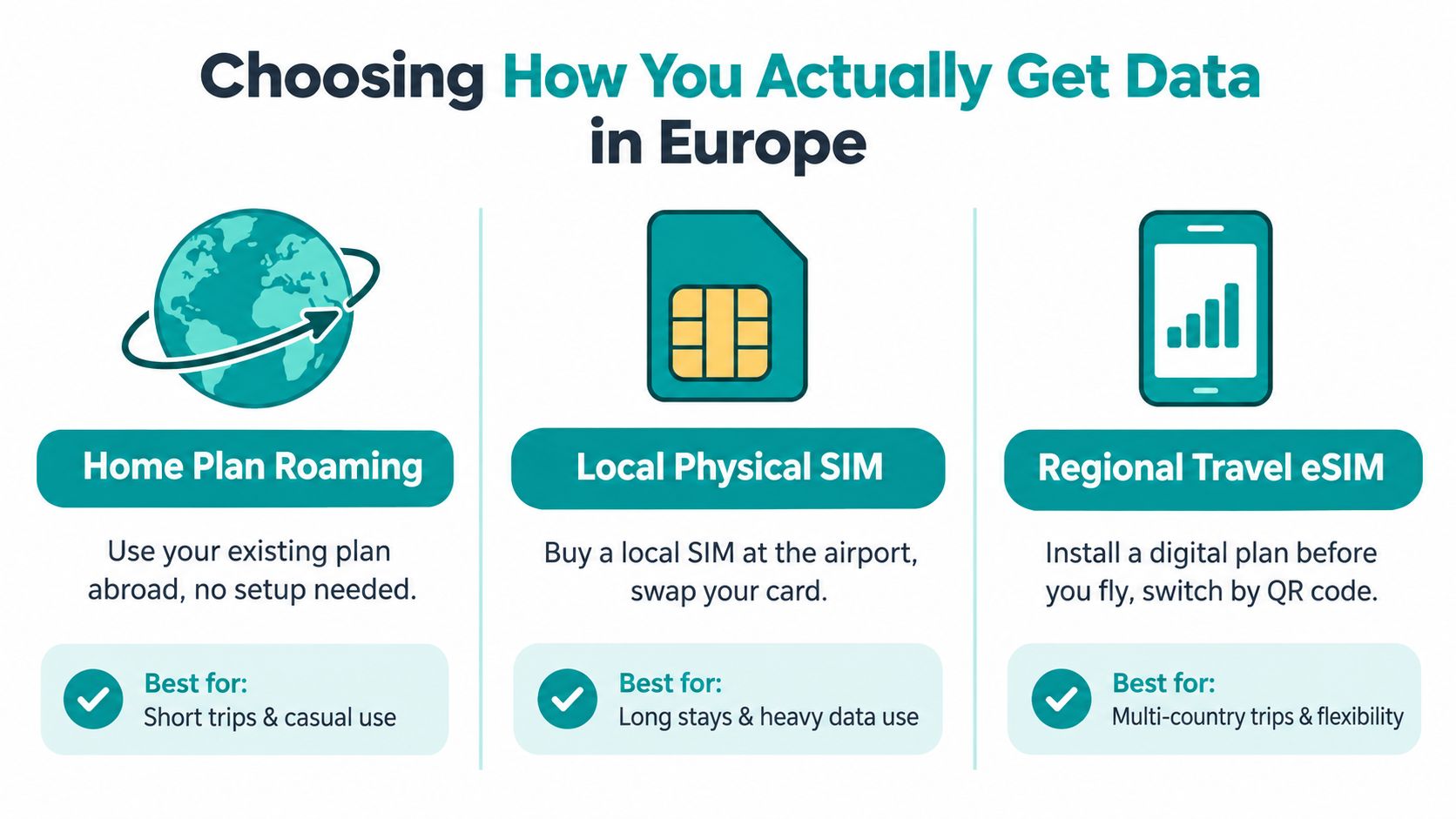
Keep your home plan
A carrier international pass is the smoothest option when your regular number matters. Business travelers who need familiar voice service, SMS verification, and one-line billing may prefer it, even if a separate data option requires more setup. Check the carrier's official terms for every country, data allowance, high-speed limits, activation rules, billing period, and overage treatment. Don't assume a pass covering France also covers the UK, Switzerland, or the Balkans.
EU “Roam Like at Home” generally applies to EU countries plus Iceland, Liechtenstein, and Norway. It doesn't automatically cover North American subscribers, and the UK sits outside the EU framework, although some operators voluntarily extend similar benefits. The European Commission's roaming questions and answers explains why the home operator and tariff remain decisive.
Buy a local physical SIM
A local SIM suits someone staying in one country for weeks, especially when local calls or a local number matter. You'll need a phone that accepts other carriers, a compatible SIM slot, and time to complete the shop or airport setup. It also means removing or storing your home SIM, then keeping track of which number receives authentication messages.
This route becomes cumbersome on a multi-country itinerary. A domestic SIM may work beyond its home country under its own terms, but you must verify that coverage rather than assume it.
Install a regional travel eSIM
A regional eSIM fits the traveler crossing borders who wants data ready before landing. Simsima sells data-only travel eSIMs covering more than 190 destinations, so the plan doesn't provide a local phone number and can't make ordinary calls or send SMS. You can keep the primary line available for calls and texts while assigning mobile data to the travel eSIM.
Install it on Wi-Fi before departure. Simsima supports one-tap Smart Link installation on iPhone running iOS 17.4 or later and on Android, with a QR code available otherwise. The eSIM activates automatically when it first connects to a local network at the destination, and installation alone doesn't count as activation for the 14-day unactivated-eSIM refund policy. Networks are the ones listed in each plan's details, so check those details against your itinerary. Top-ups are available through the Simsima account, and support replies within 24 hours. For setup differences between physical and digital SIMs, see eSIM versus SIM card.
Why Unlocked Alone Is Not the Full Story
A carrier-removed lock is one checkbox, not a verdict. It means the operator has deleted the software restriction that stops another SIM from registering. It doesn't add LTE bands, create VoLTE support, repair an IMEI block, or make a 3G-only phone useful after legacy networks are retired.
That distinction matters most with older devices and imported regional variants. A phone may display a European network name and mobile-data icon while voice service fails because VoLTE isn't provisioned. Or it may connect in a dense city but lose coverage when the network depends on a band the handset doesn't support.
Fair-use rules create a second problem for long trips. In 2024, 80% of operators applied at least one fair-use measure, while 4.65% of roamers reached the relevant limits in the third quarter, according to the European Commission staff working document on roaming. Most ordinary tourists won't encounter the limit, but remote workers and long-stay travelers should pay attention to data allowances, four-month usage monitoring, and warnings from the operator.
My recommendation for most North American travelers
For a typical one-to-three-week trip, choose a SIM-free, eSIM-capable 4G/5G phone and pair it with a regional data plan after checking the bands and destinations. That setup avoids physical-SIM swaps and keeps your home number available when the device supports dual SIM.
A carrier pass is better when calls and SMS on the regular number are central. A local SIM is better for extended stays in one country or frequent local calling. If your trip involves remote work or a potential long stay in Greece, review practical residency and income considerations in 3 500 income rules for the Greek, then verify connectivity requirements separately. For the specific iPhone lock check, use how to check if an iPhone is unlocked.
When Another Option Beats a Travel eSIM
A regional travel eSIM isn't automatically the right answer. It's a data tool, and data-only service is a poor fit when your trip depends on a local phone number or heavy voice calling.
Choose a carrier international pass when keeping your regular number active is the priority. That's the practical choice for business travelers who need familiar calls, SMS codes, and carrier support without changing the primary line. Read the current official carrier terms before departure, especially if the itinerary includes the UK, Switzerland, or other destinations outside the EU roaming framework.
Choose a local SIM when you'll spend weeks in one country and need local calls, local messaging, or a domestic number. It takes more setup, but the arrangement can be clearer for a long single-country stay than a regional data-only plan.
Choose Wi-Fi when you're taking a short city break, staying mostly in one hotel, or spending time on a cruise with dependable onboard access. It won't help you find routes between stations or call a taxi away from coverage, so download maps and tickets beforehand. Hotel operators can reduce connection problems with hotel guest Wi-Fi best practices, but public networks still deserve caution.
A locked, older, or eSIM-incompatible phone may make a physical SIM or carrier roaming the least frustrating solution. Don't buy a new device for a single trip unless the current phone fails the compatibility test and reliable connectivity is essential.
Troubleshooting When Things Go Wrong on Arrival
The phone lands, the airplane mode switch goes off, and the data icon stays blank. Start with settings, not panic.
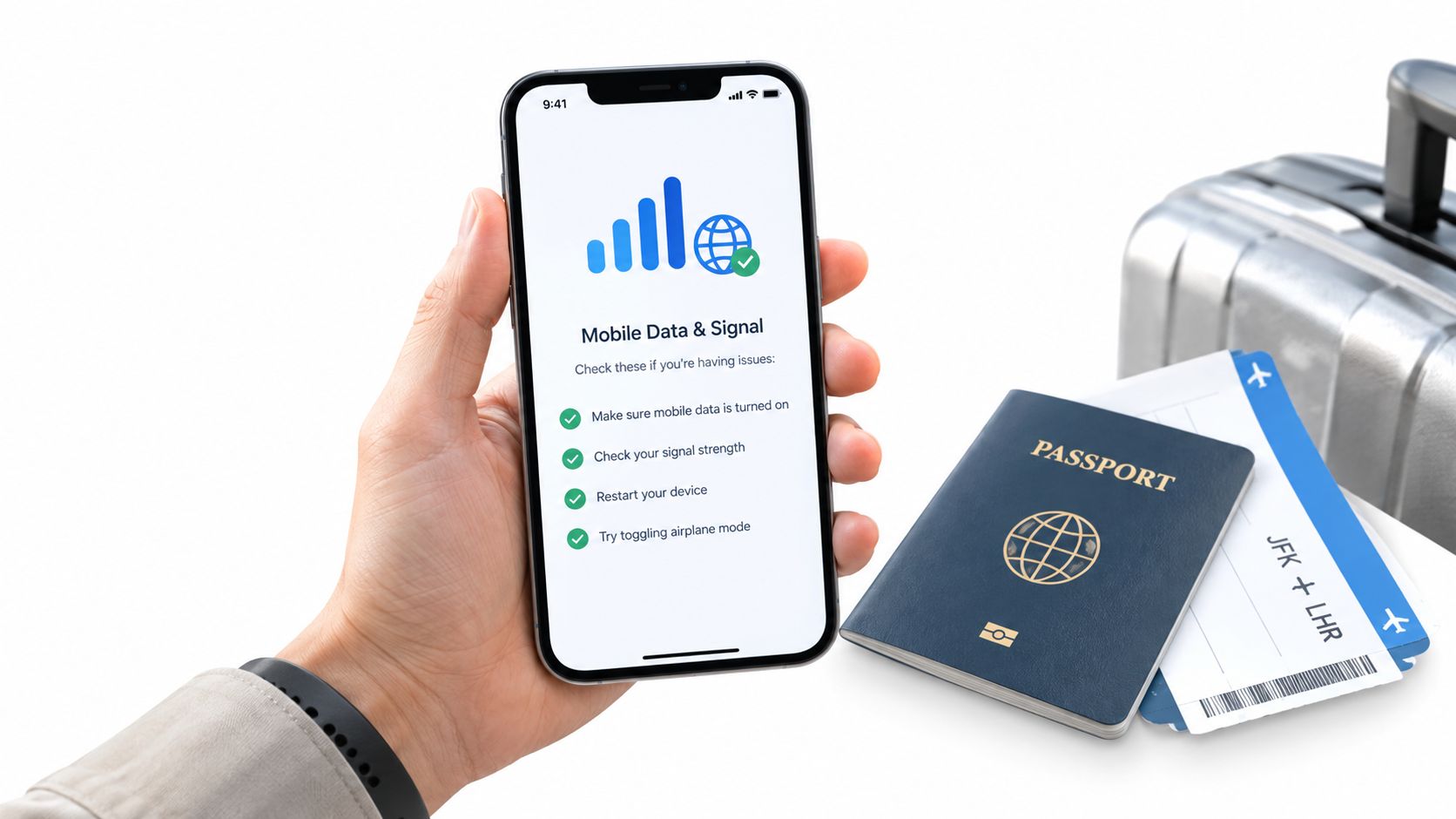
- Wrong data line: Open cellular settings and assign mobile data to the travel eSIM or local SIM.
- eSIM disabled: Turn the travel line on and confirm the plan is selected for data.
- Roaming switch off: Enable data roaming when the travel plan requires it. Follow the plan's instructions.
- APN missing: Check the provider's APN details and enter them exactly if the phone didn't configure them.
- Weak legacy connection: Set network selection to automatic, then restart or toggle airplane mode so the phone can register on a current partner network.
- No VoLTE: Confirm that the device and line support VoLTE. Mobile data alone doesn't guarantee voice service.
Installing a Simsima eSIM doesn't activate it. Activation occurs when it first connects to a local network, so the 14-day refund window for an unactivated eSIM remains relevant after installation, provided it hasn't connected at the destination.
Do the test at home: install on Wi-Fi, enable the travel line, turn Wi-Fi off, and open a webpage. This one-minute check exposes an APN error or wrong-line setting before you're standing outside baggage claim with no connection.
After you've reviewed the settings, this visual walkthrough can help you identify the mobile-data controls:
Frequently asked questions
Will an American phone work in Europe?
Usually, if it's modern, free of carrier restrictions, compatible with the destination's LTE or 5G bands, and paired with roaming or a separate data plan. Check the exact regional model rather than relying on the phone's retail name.
Does an unlocked phone work everywhere in Europe?
No. Removing the carrier SIM restriction does not guarantee band compatibility, VoLTE support, or coverage on every network and destination.
Can I keep my US or Canadian number?
Usually, yes, if your phone supports dual SIM and your home line remains active. Assign mobile data to the travel line and check whether leaving the home line enabled can trigger roaming charges under your carrier's terms.
Is a travel eSIM the same as a local SIM?
No. A regional travel eSIM can provide mobile data across its listed destinations without a physical card, while a local SIM may provide a domestic number and local voice or SMS. Check the plan details before buying.
What should I do before departure?
Record the exact model, confirm the phone is not carrier-locked, compare bands, verify VoLTE, check every destination, install the SIM or eSIM on Wi-Fi, and test mobile data with Wi-Fi disabled.
Simsima offers data-only travel eSIMs for more than 190 destinations, with installation before departure through Smart Link or a QR code and automatic activation when the eSIM first reaches a local network. Visit Simsima to check the Europe plan's destinations and network details, then match them against your phone and itinerary before you fly.






#phone in europe#europe esim#unlocked phone#travel data#roaming in europe

Dimitri MorvanFounder
Founder of Simsima. A passionate traveler based in Barcelona, he helps travelers stay connected without breaking the bank on roaming fees.
LinkedIn